Pollo AI Review: A Simple AI Video Editor for Social Media Creators

Our guides are based on hands-on testing and verified sources. Each article is reviewed for accuracy and updated regularly to ensure current, reliable information.Read our editorial policy.
If you’ve spent an afternoon hunting down the right lighting effect or manually erasing a background frame by frame, Pollo AI will feel like a shortcut you should have found sooner. The pitch is simple: type what you want, and the AI edits the clip. No timeline wrestling, no plugin stacks. Upload, prompt, download.
This review covers Pollo AI’s features, how it performs in real tests, what the limitations look like in practice, and who it works best for. If you also make short social clips or meme videos, there’s a good chance Pollo AI fits neatly into your GIF meme workflow too.
What is Pollo AI Video Editor?
Pollo AI video editor takes text prompts and applies them to your uploaded clip. Want to shift the scene from daytime to nighttime? Write it. Want to age up a character or swap their outfit? Write it. The AI platform handles the rest.
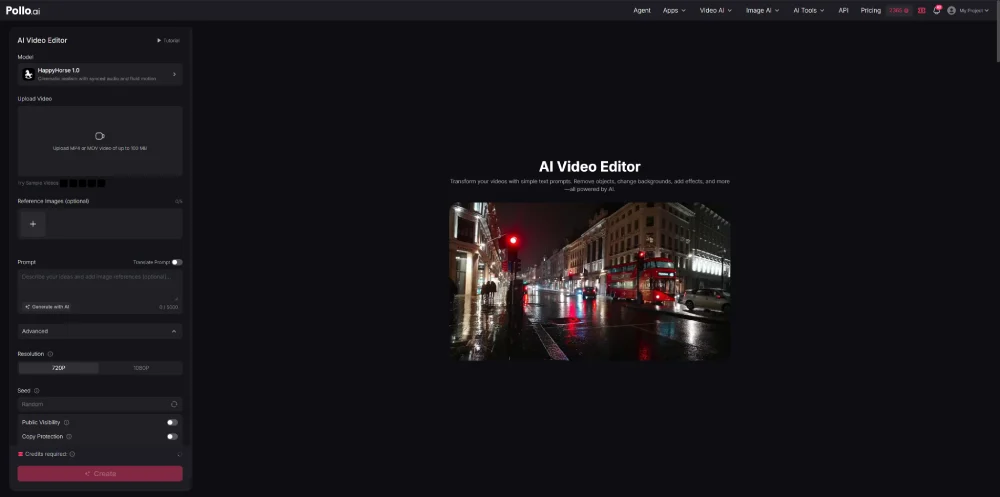
The typical workflow: upload a clip, describe the change, hit generate, and get the result in seconds. There are no keyframes, masks, or layer blending to learn.
That simplicity is what makes it genuinely useful for social media creators, marketers, and anyone who just wants a usable clip without spending an hour in a full editor.
Pollo AI Key Features
1. Edit Videos With a Simple Prompt
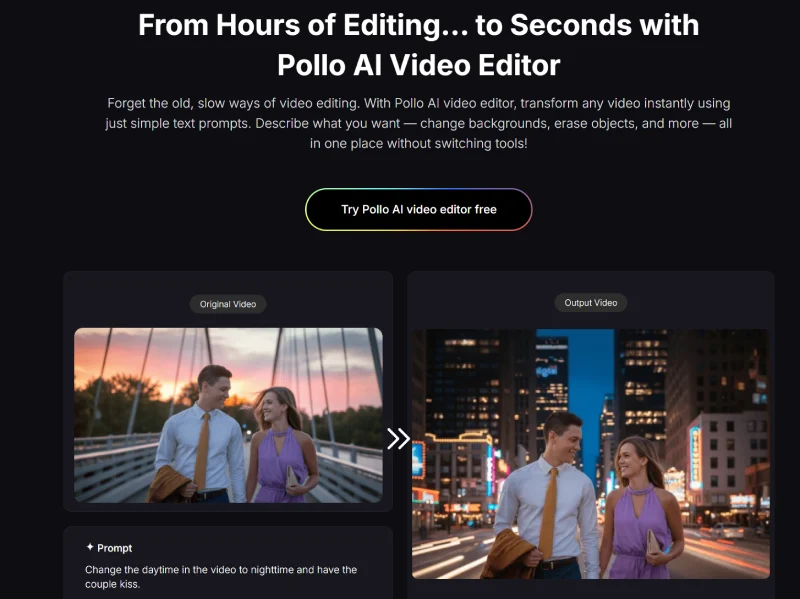
This is the core of what Pollo AI does. You type an instruction – “change the daytime to nighttime and have the couple kiss” – and the AI produces it. No manual layer work, no separate plugin needed. It works well as a quick video meme editor too. A couple of typed instructions and you have something shareable.
2. Modify Subject Appearance
You can adjust how subjects look: age them up or down, change outfits, modify hair. The changes apply naturally, which matters if the end result needs to look polished rather than obviously AI-generated. Useful for branding, storytelling, or any project where visual consistency across clips is important.
3. Change Weather and Atmosphere
Pollo AI can shift a sunny scene to rain, a daytime setting to night, or warm color tones to cool ones. No re-shoot needed. For short social clips where mood matters more than production detail, this is a fast win.
4. Add Visual Effects
Anime filter. Cyberpunk overlay. Cinematic sparks. You describe the effect in the prompt and the AI generates it. You don’t need to stack plugins or know which LUT achieves which look.
5. Erase Unwanted Objects
Watermarks, background distractions, clutter in the frame – Pollo AI can remove them. The alternative is manual frame-by-frame editing, which is slow. This feature alone saves real time on cleanup work.
6. Alter Backgrounds and Adjust Camera Angles
You can pull out backgrounds and replace them with something custom or transparent, and shift the camera perspective – aerial, orbiting, wider. Works well for instructional videos, social posts, and quick meme clips. If you need to reframe your footage before uploading, a free online video cropper handles that in your browser with no software install.
How to Use Pollo AI Video Editor
Three steps, nothing more:
Step 1: Upload Video – Select your MP4 or MOV clip.
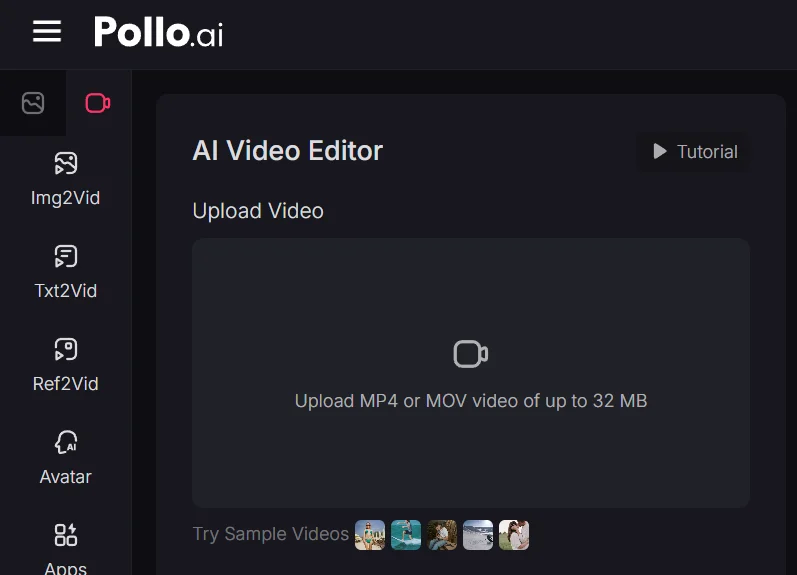
Step 2: Enter Prompt – Describe the change in plain text.
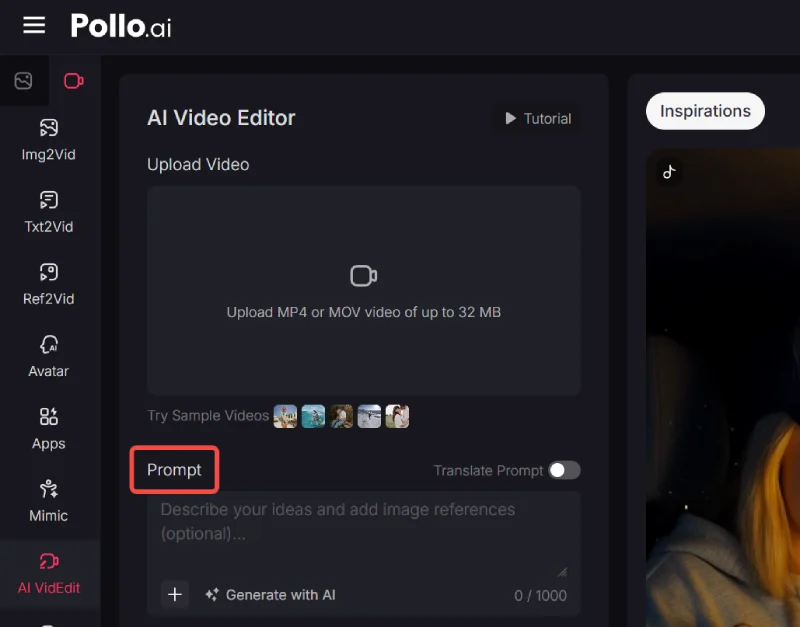
Step 3: Generate and Download – Get the edited clip in seconds.
The workflow itself has almost no learning curve. The actual skill is in writing prompts that produce what you want. More on that in the tips section below.
Video Editing Performance Test of Pollo AI
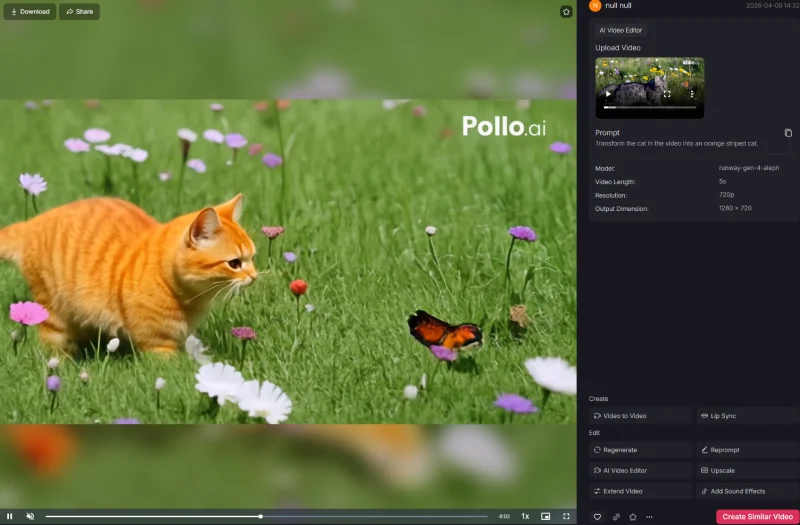
The test: a 5-second MP4 of a cat, with the prompt “Transform the cat in the video into an orange striped cat.” Generation took roughly three minutes.
The result was better than expected. The orange stripes looked realistic – the fur pattern followed the cat’s natural body contours rather than sitting on top like a color filter. No color blocks, no distortion, no uncanny-valley texture. It looked like a genuinely different cat.
More importantly, nothing else changed. The background, lighting, and scene composition stayed intact. Pollo AI isolated the subject and modified only that. For content creation, that kind of selective precision matters – you don’t want to re-edit the whole frame because one element changed.
That said, the tool has real constraints. Videos cap at 5 seconds. Files must be MP4 or MOV, under 32 MB. Output maxes out at 720p. If your clip is longer than 5 seconds, trim it first – a free browser-based video cutter handles that without any file upload.
If the file is over 32 MB, an online MP4 compressor can get it under the limit in a few clicks. Shooting on iPhone in MOV format? A free MOV to MP4 converter preps the file without re-encoding. These aren’t dealbreakers for social clips, but they do rule out longer or higher-resolution work.
My Tips
Prompt clarity matters more than most people expect going in. “Make it rainy” produces vague results. “Change the scene to a rainy evening with soft reflections on the street and gentle rain animation” produces something actually usable. Specificity is the real skill here.
Get your clip under 5 seconds and under 32 MB before you start. For meme-style clips, combining Pollo AI edits with text overlays and exaggerated effects tends to land well. Once you’re done, a video to GIF converter turns the output into something you can drop straight into Twitter or Discord without a video player. Test iteratively for anything with multiple subjects or complex effects – the first prompt rarely nails it.
Pollo AI has a strong track record on Trustpilot, with consistent praise for ease of use and responsive customer support. If you need something focused more on quality enhancement than scene transformation, the Vmake AI review covers a different angle on the same problem.
Advantages of Pollo AI Video Editor
- Speed: AI handles edits in seconds that would take hours manually.
- All-in-One: Background changes, object removal, effects, and camera adjustments without switching tools.
- No Learning Curve: Text prompts replace complicated timelines.
- Creative Range: Artistic styles, mood shifts, and meme-ready edits all work.
- Social-First: Outputs sized for TikTok, Instagram Reels, and YouTube Shorts.
- User-Trusted: Strong Trustpilot ratings and a high volume of positive reviews.
Conclusion
Pollo AI is a good fit for social media creators, marketers, and anyone producing short-form content at volume. The text-prompt editing is fast, the subject isolation is accurate, and the workflow is simple enough to go from raw clip to finished edit in a few minutes.
The 5-second limit and 720p ceiling will frustrate anyone doing serious production work. But that’s not who this is built for. For quick edits, viral clips, and meme-ready content, it delivers what it promises.
About Himanshu Tyagi
At CodeItBro, I help professionals, marketers, and aspiring technologists bridge the gap between curiosity and confidence in coding and automation. With a dedication to clarity and impact, my work focuses on turning beginner hesitation into actionable results. From clear tutorials on Python and AI tools to practical insights for working with modern stacks, I publish genuine learning experiences that empower you to deploy real solutions—without getting lost in jargon. Join me as we build a smarter tech-muscle together.