7 Best Chess Move Calculator Websites

Our guides are based on hands-on testing and verified sources. Each article is reviewed for accuracy and updated regularly to ensure current, reliable information.Read our editorial policy.
Chess engines are no longer the exclusive tools of grandmasters. A blunder in move 24, a line you couldn’t calculate, a position that felt lost but probably wasn’t — these are the moments that send thousands of casual players searching for a “chess best move finder” after the game ends.
This guide covers the best tools for exactly that: post-game analysis, opening exploration, and position study. Every tool was tested in April 2026 to confirm the website works, the free tier is intact, and the core features are still available. I’m a casual player myself, so I’ll tell you where each tool genuinely helps — and where it gets in the way.
What is a chess solver?
A chess solver is an online application that looks at a given position and calculates the optimal continuation using a computer engine such as Stockfish. Most solvers let you set up pieces on a virtual board or paste a position in Forsyth–Edwards Notation (FEN).
The engine then applies search algorithms to evaluate millions of moves per second and returns the recommended move along with an evaluation score.
Solvers are used for post‑game analysis, not to cheat — the major platforms prohibit engine assistance during games. Some solvers also analyse entire games or puzzles, grade your moves, and provide human‑readable explanations.
Quick Comparison of Chess Calculator Websites
| Tool | Free Tier | Best for | Image input? |
|---|---|---|---|
| Lichess Analysis | Unlimited board editor and cloud engine analysis; deep server analysis limited to 40/day | All players, especially those who want free unlimited analysis | No (board only) |
| Chess.com Analysis | One game review/day; full engine analysis requires subscription | Casual Chess.com users; quick reviews | No |
| Next Chess Move | Free single-position calculations with 5-second think time | Rapid move suggestions; quick references | No |
| Chesshub | Free position solver with FEN input and board controls | Beginners wanting a simple web board | No |
| Chessigma Next Move | Unlimited in-browser Stockfish 17 analysis | Free, no-login move advice | No |
| Chess It Up | Unlimited PGN game analysis at depth 12 | Players who want full game grading and accuracy scores | No |
| DecodeChess | One free game decode per day | Learning why moves are good; in-depth study | No |
Best Chess Move Finder Websites
The tools below are ranked by usefulness for casual players, not by raw engine strength. All of them run Stockfish or another top engine under the hood.
1. Lichess Analysis Board

Lichess is a free, open‑source platform supported by donations. The Analysis Board allows you to set up any position, run a Stockfish 16 + NNUE engine and explore variations.
The features page explicitly states that the board editor and analysis board are available to free accounts without limits. Deep server analysis is limited to 40 games per day, but the on‑board engine analysis and cloud engine analysis are unlimited for everyone.
How to use it: Go to Tools → Analysis board on Lichess. Drag pieces or paste a FEN. Click the engine icon to start Stockfish. You can toggle between a single best line and multi‑line analysis. The board also shows opening names and lets you explore alternatives through an interactive move tree. No login is required to use the basic engine, though logging in allows you to save studies.
Pricing: Lichess is completely free. There is an optional patron programme that removes the small “patron” badge and supports development, but no engine features are locked.
Downside: The engine depth on the client side is limited by your device’s CPU. The deep server analysis (which calculates at higher depth on Lichess servers) is capped at 40 requests per day.
Best for: players of all levels who want unlimited, no‑cost analysis and are comfortable exploring variations themselves.
Suggested Read: 5 Free Meme Search Engine Websites for Unlimited Memes
2. Chess.com Analysis Board

Chess.com is the largest commercial chess platform. Its analysis board also runs Stockfish and provides a game‑review feature that grades moves and highlights blunders.
However, the site limits free users to one game review per day and locks full engine analysis behind a premium subscription. Chess.com free users need a Diamond membership to access full engine review.
How to use it: Navigate to chess.com/analysis. You’ll need to create a free account. Load a position by dragging pieces or uploading a PGN. Click the Review button to see engine recommendations and an evaluation bar. Premium members can request deeper analysis and see multiple engine lines.
Pricing: Free users get one “Game Review” per day. Deeper analysis, unlimited reviews, and instructive videos require a paid membership (Diamond or above).
Downside: The hard daily limit is frustrating. Without paying, you can only perform shallow analysis or wait until the next day. The site also shows ads to non‑members.
Best for: players who are already active on Chess.com and only need occasional analysis.
3. Next Chess Move

Next Chess Move offers a simple interface: drag pieces onto a board, press Calculate next move, and the site returns the best move. It uses Stockfish and other engines and also offers a Pro version. The main page instructs you to “Drag pieces to configure the board and press Calculate next move”.
How to use it: Set up the position by dragging pieces or paste a FEN. Click the Calculate next move button. By default, the engine thinks for five seconds on a single core. Multi‑PV (multiple best moves) and longer think times are available only with the pro version.
Pricing: The free tier runs on a single‑core AMD EPYC server and limits think time to five seconds per move. NCM Pro costs $19/year and uses 16‑core Ryzen 7950X servers. A free trial includes 10 minutes of calculation credit. Paid users can set think times from 100 milliseconds up to 30 seconds and access stronger engines and extra features like multi‑PV and tablebases.
Downside: Free calculations are short and the site displays ads. For deeper analysis you need to pay, and there is no way to analyse full games — only single positions.
Best for: quick, single‑position calculations when you want a fast answer and don’t mind brief think times.
4. Chesshub Analysis Board

Chesshub provides a web‑based board where you can set up a position and ask Stockfish for the best move. The interface invites you to “enter your position onto the board … press White or Black to move. We will calculate the best move”. Buttons below the board allow you to flip, reset, load FEN and choose which side to move.
How to use it: Go to Chesshub.com/analysis and drag the pieces into place. When the position is ready, click White to Move or Black to Move. The engine highlights the best move and provides an evaluation bar. You can also paste a FEN string into the FEN box.
Pricing: The analysis board is free and does not require an account. Chesshub also offers a membership with additional features like an openings explorer and database, but the basic solver works without payment.
Downside: The site has occasional performance hiccups and the board resets if you accidentally refresh the page. There is no option to analyse full games or see deeper lines.
Best for: beginners who want a straightforward, no‑login position solver.
5. Chessigma Next Move Calculator

Chessigma started as a free game‑analysis tool and recently added a Next Move Calculator. The calculator runs Stockfish 17 in your browser and claims to be “free, unlimited, no sign‑up required”. It lets you set up a position or paste a FEN and then calculates to depth 20 or more depending on your device.
How to use it: Visit chessigma.com/tools/next‑move. Make moves on the blank board to reach your position or click Paste FEN. Hit Find Best Move and the engine returns the best move and evaluation. Because Stockfish runs locally, there is no waiting for servers.
Pricing: Chessigma’s calculator is completely free. There is no move limit, no login required and no premium tier for the calculator. The parent site also offers a game‑analysis tool that grades every move. Chessigma emphasises that Chess.com limits free users to one game review per day, whereas Chessigma allows unlimited reviews.
Downside: Local analysis means speed depends on your computer or phone. There is no server‑side deep analysis, and you can’t analyse entire games automatically.
Best for: players who want a free, no‑login move suggestion and don’t need full game grading.
6. Chess It Up

Chess It Up is a solo‑developer project that offers free unlimited game analysis with Stockfish NNUE. The site explains how to use it: enter your Chess.com or Lichess username or paste a PGN, then run Stockfish analysis. Free users can analyse to depth 12, while premium subscribers get depth 25.
How to use it: Paste your PGN or load games from Chess.com/Lichess using your username. Click Full Game Analysis; the engine evaluates every move and provides an accuracy score, centipawn‑loss classifications and an evaluation graph. You can flip the board, step through moves and see recommended continuations.
Pricing: Unlimited game analyses and export/import of PGN are free. The only paid feature is deeper analysis; premium users can set the engine to depth 25. There are no ads.
Downside: The interface has occasional display glitches on mobile devices. Depth 12 is usually sufficient, but for very complex positions advanced players may want deeper evaluation. Also, the tool doesn’t provide natural‑language explanations — it’s purely numeric.
Best for: anyone who wants unlimited game analysis without paying Chess.com’s subscription. Great for learning your accuracy score and patterns of mistakes.
7. DecodeChess
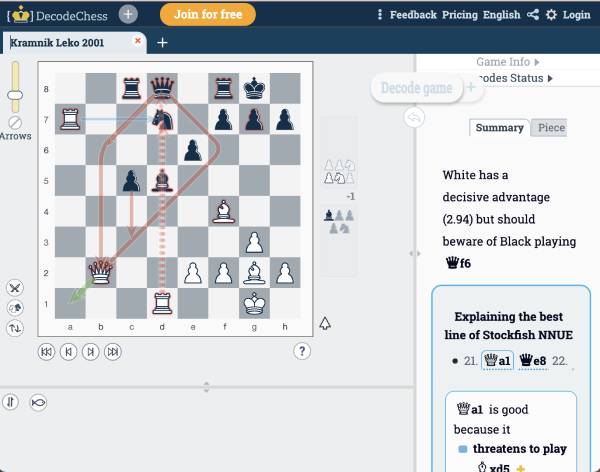
DecodeChess is unique because it doesn’t just show the best move; it explains why the move is good. Its FAQ describes a “decode” as an AI‑generated explanation that analyses an entire game or a single position. The pricing page shows a free tier that provides one game decode per day but no deep position decodes and no enhanced computing power. Paid subscriptions unlock unlimited decodes, deeper explanations and stronger hardware.
How to use it: Create a free account at decodechess.com. Upload a PGN or set up a position. Click Decode Game to get a summarised explanation of every move or Deep Decode for a detailed analysis of one position. The tool highlights threats, plans, piece functions and concepts, and it uses Stockfish NNUE under the hood.
Free vs paid: The free plan allows one game decode per day and doesn’t include deep position decodes or extra computing power. Monthly plans (≈US$8.25) or pay‑as‑you‑go credit packages unlock unlimited decodes and deeper analysis.
Downside: Because each decode uses significant server resources, the free quota is tiny. Natural‑language explanations are slower to generate than a simple engine evaluation. Also, there is no mobile app for iOS, and exporting analyses isn’t available yet.
Best for: players who want human‑readable explanations and are willing to pay for more than a handful of decodes per week.
Also Read: Top 6 Quote Search Engine Tools to Explore Inspirational Quotes
Can you find the best move from a picture?
A growing number of users search for “best chess move from picture.” Typical chess engines require you to type a FEN or set up the board manually, but a few tools can scan an image and convert it into a position.
In March 2023, Chessify integrated its scanner into the website; the scanner lets users upload a photo of a chessboard and have the position digitized for engine analysis.
The app’s scanner uses optical character recognition to digitise positions from books, screens or real boards and that scanning is free for registered users. To use it you must log in to the Chessify analysis dashboard, click Scan Board, upload your image, adjust any details (whose move, orientation), and then proceed to engine analysis.
Mobile apps such as Chessvision.ai also let you take a photo of a board and open the position in Lichess analysis. It can scan chess positions from prints and 2D digital sources and then open the Lichess analysis board.
These tools are convenient for studying puzzles from books, but they should never be used during live games — using any engine assistance while playing violates tournament rules and site terms of service.
Final Words
If you’re serious about improving at chess, running your games through a strong engine is indispensable. For most players the best choice is Lichess, which offers unlimited analysis without cost and a vibrant community. Chess It Up and Chessigma provide great alternatives for full‑game reviews and quick move calculations.
Next Chess Move is handy when you need an instant answer, but consider upgrading only if you regularly demand deeper evaluations. Finally, if you’re trying to understand why a move is good, DecodeChess offers human‑readable explanations, though the generous features require a subscription.
Whichever tool you choose, remember to use it ethically: study your games after they finish, try to understand the engine’s suggestions, and then apply those lessons in your next match.
About Himanshu Tyagi
At CodeItBro, I help professionals, marketers, and aspiring technologists bridge the gap between curiosity and confidence in coding and automation. With a dedication to clarity and impact, my work focuses on turning beginner hesitation into actionable results. From clear tutorials on Python and AI tools to practical insights for working with modern stacks, I publish genuine learning experiences that empower you to deploy real solutions—without getting lost in jargon. Join me as we build a smarter tech-muscle together.