8 Best Free PCAP Analysis Tools for Windows 11

Our guides are based on hands-on testing and verified sources. Each article is reviewed for accuracy and updated regularly to ensure current, reliable information.Read our editorial policy.
Network engineers and incident‑response teams rely on packet‑capture (PCAP) files to understand what really happened over a network. A PCAP file is a binary record of packets captured on an interface; each entry contains the time stamp, source/destination addresses and ports, protocol headers, and payload.
These files allow analysts to troubleshoot sluggish applications, uncover security breaches, and document compliance. However, reading raw PCAP files is tedious without software that can decode protocols and present results in a human‑friendly way.
The list below focuses on actively developed tools that run on Windows 11, are free to use (some offer optional paid editions), and are approachable for beginners.
What to look for in a PCAP analysis tool
When evaluating packet‑analysis utilities, consider the following criteria:
- Windows 11 support: The tool should run natively on modern 64‑bit Windows. Some tools below also support Windows 10 and other platforms.
- Active development: Look for recent release notes, security audits, or community activity. Tools with no updates for a decade are excluded or flagged.
- Ease of use: A clean interface, sensible defaults, and helpful documentation make a big difference for beginners. Command‑line utilities are powerful but come with a learning curve.
- Feature set: Packet analysis goes beyond just opening a file. Important features include live capture, protocol decoding, filters, statistics, visualizations, file or credential extraction, and export to other formats.
- Cost: All tools listed here offer free versions; some have optional paid tiers. Pricing information is noted where relevant.
Also Read: 10 Best Network Management Software for Small Businesses
Top PCAP analysis tools for Windows
1. Wireshark
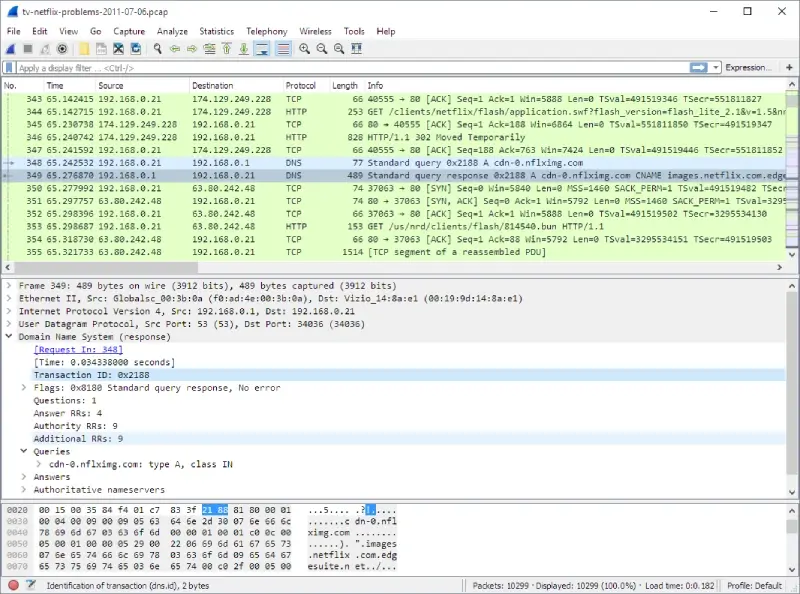
Wireshark is a powerful open‑source tool that can capture traffic live or analyze saved PCAP/PCAPNG files. It is maintained by the Wireshark Foundation and supports hundreds of protocols.
Key features
- Deep protocol inspection: Wireshark lets you capture and interactively browse network traffic. Its core purpose is to provide deep inspection of hundreds of protocols.
- Free and open source: The tool is released under the GNU GPL and is freely available for use and distribution. There is no “lite” edition – you get the full feature set.
- Cross‑platform: Official downloads exist for Windows x64, Windows ARM64, macOS, and Linux.
- Active community: A large user base contributes bug fixes, new protocol dissectors, and tutorials.
- Display filters: Powerful filters let you isolate traffic by IP address, port, protocol, or even packet contents.
Pros
- Comprehensive protocol support and decoding for thousands of protocols.
- Completely free with no feature limits.
- Extensive documentation and community resources.
Cons
- The interface can be overwhelming for beginners; it takes time to learn its filters and views.
- Large capture files consume substantial memory and CPU.
Ideal for: Network engineers, developers, cybersecurity students, or anyone who needs a full‑featured analyzer.
Windows compatibility: Windows 11 and Windows 10 (x64 and ARM64 installers are provided). Portable builds are also available.
Pricing and license: Free, GPL‑licensed.
2. NetworkMiner
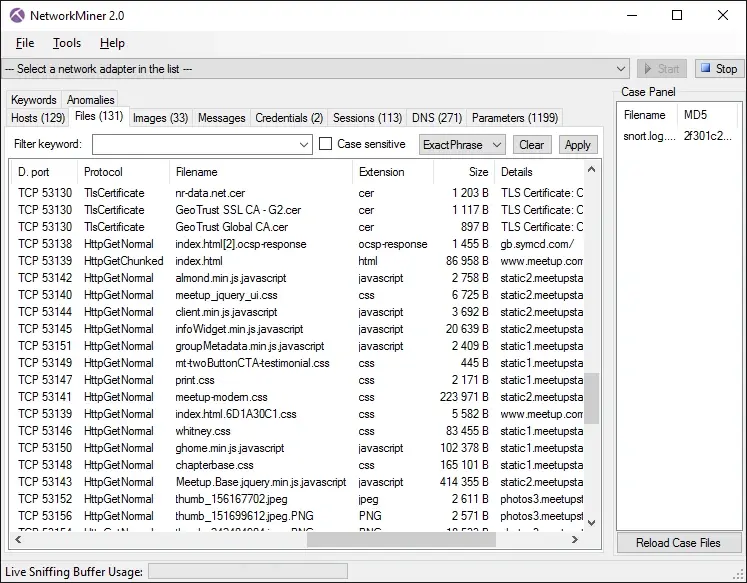
NetworkMiner is an open‑source network forensics tool focused on extracting evidence from PCAP files. NetworkMiner displays hosts, sessions, and files, making it easier to reconstruct events.
Key features
- Windows‑first design: NetworkMiner is primarily designed to run on Windows but can also be used on Linux.
- PCAP/PCAPNG parsing: Both the free and professional editions support live sniffing and parsing of saved PCAP and PCAPNG files.
- Artifact extraction: NetworkMiner can extract files (FTP, HTTP, SMB, SMTP, and others), X.509 certificates, VoIP audio, and other artifacts from captured traffic.
- IPv6 and decapsulation support: It decapsulates GRE, 802.1Q, PPPoE, VXLAN, and other tunneling protocols.
- JA3/JA4 fingerprinting: The tool calculates TLS client/server fingerprints to identify applications and malware.
- OS/host fingerprinting and OSINT lookups: Features such as port‑independent protocol identification and offline IP‑to‑country/ASN lookups help analysts profile hosts.
- Keyword and credential search: Extracted usernames and passwords appear in a dedicated Credentials tab. You can also search for capture data by string.
Pros
- Extracts files, images and credentials directly from PCAP files.
- Runs without installation; you can copy it to a USB drive.
- Free edition is feature‑rich; professional edition adds scripting and advanced filters.
Cons
- The user interface feels dated compared to modern tools.
- The professional license is expensive (US$1300), though the free edition may suffice for most users.
Ideal for: Digital forensics investigators and security analysts who need to extract evidence from PCAPs.
Windows compatibility: Windows 11/10 and Windows sandbox; portable application.
Pricing and license: Free edition (GPL) and paid professional edition.
Suggested Read: 7 Best SNMP Manager Software For Windows 10
3. Sniffnet
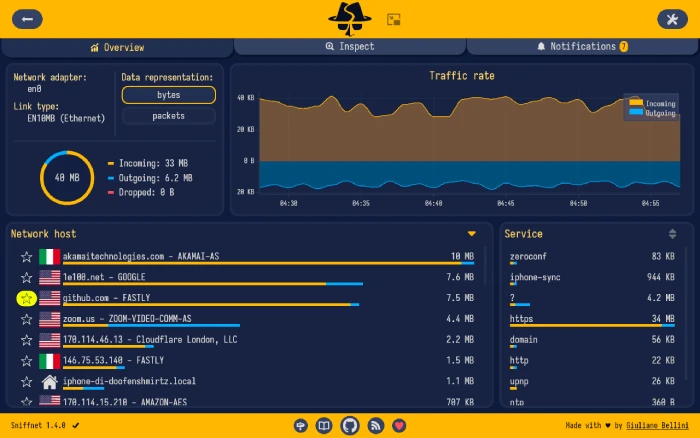
Sniffnet is a modern, cross‑platform network monitor written in Rust. It emphasizes ease of use and privacy and can import/export PCAP files. The tool is dual‑licensed under the MIT and Apache 2.0 licenses.
Key features
- User‑friendly design: The developers highlight that Sniffnet focuses on user experience, offering a simple interface available in 24 languages.
- Security‑first development: Security audits validate the application’s safety.
- Free and open source: Sniffnet is completely free and open source, dual‑licensed under the MIT and Apache‑2.0 licenses.
- Statistics and real‑time charts: It lets you choose a network adapter, apply filters, and view statistics or real‑time traffic intensity graphs.
- PCAP import/export: You can import and export capture reports as PCAP files.
- Protocol and service identification: Sniffnet identifies more than 6000 services, protocols, trojans, and worms.
- Domain and geography lookup: It reveals domain names, autonomous system numbers (ASNs), and geographical locations of remote hosts.
- Local network discovery and favorites: The tool can discover connections inside your local network and lets you mark favorite hosts.
Pros
- Friendly interface suitable for beginners.
- Cross‑platform (Windows, macOS, and Linux) and updated regularly.
- Customizable notifications and themes.
Cons
- Primarily a network monitor rather than a full forensic tool, it lacks the advanced artifact extraction found in NetworkMiner.
- Reports are less detailed than those produced by tools like Wireshark.
Ideal for: Home users or small teams wanting a simple visual network monitor and PCAP importer.
Windows compatibility: The official download page provides installers for Windows x64, x86, and arm64, confirming support for modern Windows.
Pricing and license: Free; dual‑licensed under MIT/Apache‑2.0.
4. PRTG Network Monitor
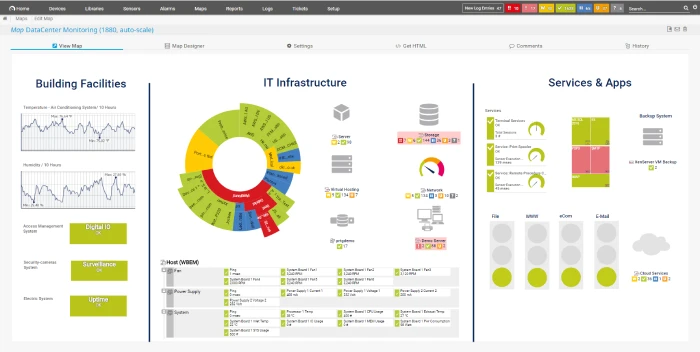
PRTG is primarily a comprehensive network monitoring suite, but it includes a packet‑sniffer sensor that can analyze traffic in real time. The free edition allows up to 100 sensors, making it suitable for small networks.
Key features
- Free monitoring with 100 sensors: Paessler offers PRTG Network Monitor with 100 sensors for free for life. This is enough to monitor critical devices, applications, and traffic on a small network.
- All features included: The free edition includes all monitoring functionalities, real‑time alerts, and customizable maps/dashboards.
- Packet‑sniffing sensor: PRTG has a built‑in packet‑sniffer sensor that lets you monitor traffic by protocol and application. It uses technologies like packet sniffing, SNMP, WMI, and NetFlow.
- Bandwidth and traffic analysis: The dashboards reveal which applications use the most bandwidth and display protocols, connections, and IP addresses of top talkers.
- 24/7 monitoring with alerts: PRTG can send notifications by SMS, email, or other methods when thresholds are crossed.
Pros
- Combines traffic analysis with device monitoring in a single tool.
- Graphical dashboards and customizable reports.
- The free edition is generous for small environments.
Cons
- Requires installation of a monitoring server; heavier than standalone analyzers.
- 100‑sensor limit may be insufficient for larger networks; paid upgrades are expensive.
Ideal for: Small businesses or home labs wanting to monitor network health and examine traffic patterns without separate tools.
Windows compatibility: PRTG runs on Windows (and Linux in the cloud). The packet‑sniffer sensor is designed for Windows servers.
Pricing and license: Free for up to 100 sensors; commercial licenses available for larger deployments.
5. BruteShark
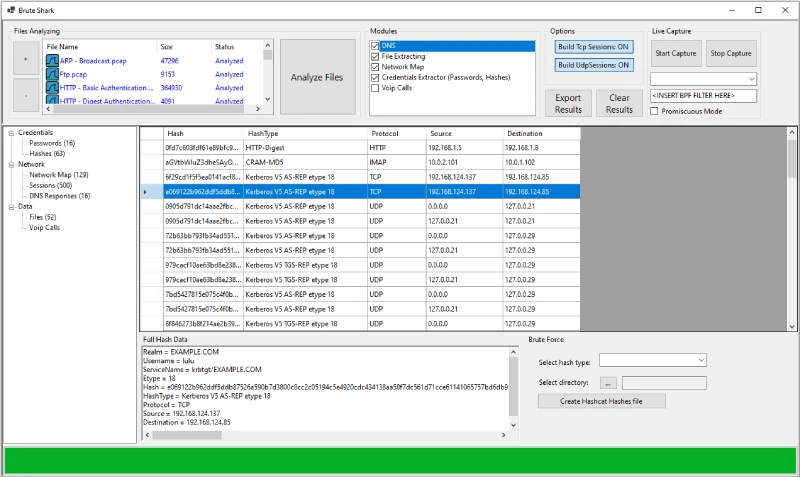
BruteShark is an open‑source Network Forensic Analysis Tool (NFAT) developed by the security researcher Oded Shimon. It provides deep processing of PCAP files and reconstructs network sessions.
Key features
- Comprehensive PCAP analysis: BruteShark performs deep processing and inspection of network traffic, primarily from PCAP files.
- Credential extraction: The tool can extract and encode usernames and passwords for protocols like HTTP, FTP, Telnet, IMAP, and SMTP.
- Hashcat integration: It converts authentication hashes into Hashcat format for offline brute‑force attacks.
- Network diagram and session reconstruction: BruteShark can build a visual network diagram of nodes and users, perform file carving, and reconstruct all TCP/UDP sessions.
- GUI and CLI versions: There are two versions – a GUI application for Windows and a CLI tool for Windows and Linux.
Pros
- Designed for digital forensics with features not found in general‑purpose sniffers.
- Free and open source.
- Useful for security researchers who need to recover credentials or examine malware communication.
Cons
- Limited documentation compared with larger projects.
- Focused on forensic use cases rather than everyday network monitoring.
- Only 64‑bit builds are available.
Ideal for: Security analysts and penetration testers who need to extract credentials from captured traffic or reconstruct sessions.
Windows compatibility: Supports Windows 11/10 64‑bit; separate CLI and GUI installers are available.
Pricing and license: Free and open source.
6. Microsoft Packet Monitor (Pktmon)
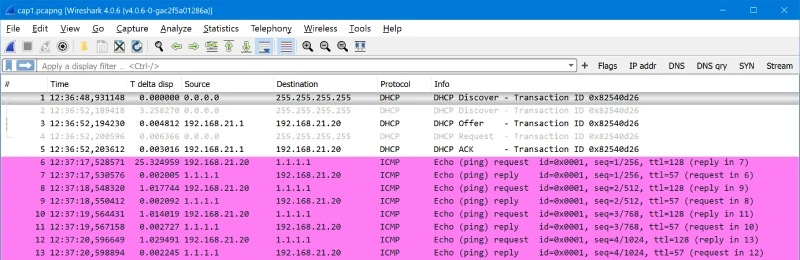
Pktmon is a built‑in packet monitoring tool introduced in modern versions of Windows. It provides command‑line packet capture and analysis within the Windows networking stack.
Pktmon can export captures to PCAPNG format for further analysis in Wireshark or other tools.
Key features
- In‑box diagnostics: Pktmon is an in‑box, cross‑component network diagnostics tool for Windows that can perform packet capture, drop detection, filtering, and counting.
- Visibility inside the networking stack: It intercepts packets at multiple locations throughout the stack, exposing packet routes and identifying where drops occur.
- Drop reason reporting: The tool reports drop reasons (e.g., MTU mismatch or filtered VLAN) to help pinpoint configuration problems.
- Flexible filters: Pktmon supports runtime packet filters with encapsulation support and logs events in various modes.
- PCAPNG export: Logs can be converted to PCAPNG format and opened in Wireshark or any PCAPNG analyzer.
- Works with Ethernet, Wi‑Fi, and mobile broadband.
Pros
- Preinstalled on Windows 10 (build 19041) and Windows 11; no additional software required.
- Provides deep insight into the Windows networking stack, useful for diagnosing virtualization and SDN issues.
- Supports exporting captures for analysis in more feature‑rich tools.
Cons
- Command‑line only; novices must learn syntax to capture and filter traffic.
- Does not offer a graphical interface or advanced decoding.
Ideal for: System administrators, developers, and IT professionals who need to diagnose network issues within Windows without installing third‑party software.
Windows compatibility: Built into Windows 10 (build 19041) and later, including Windows 11.
Pricing and license: Free, part of Windows.
7. Brimcap
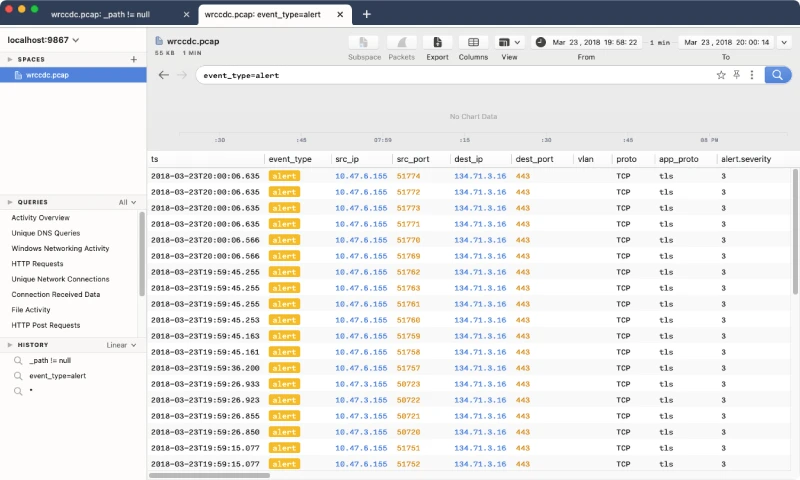
Brimcap is an open‑source command‑line utility that converts PCAP files into Zed’s flexible, searchable data formats and generates summary logs used by Zui (formerly Brim), a desktop GUI for exploring PCAPs and logs.
Brimcap is bundled with Zui and provides an alternative workflow for packet analysis.
Key features
- PCAP processing in Zui: The Zui documentation notes that functionality related to PCAP processing, including Zeek and Suricata summary log generation and import/export workflows, is handled by Brimcap, which is bundled with Zui.
- Cross‑platform downloads: Brim Data provides Zed (command‑line tools) and Zui (GUI) downloads for Windows, macOS, and Linux. Both Zed and Zui are free to download and use.
- Flexible query language: Zui leverages the Zed language to query and aggregate data imported from PCAPs.
- Rich context: The tool integrates with Zeek and Suricata to produce enriched logs that can be searched, filtered, and aggregated. This allows analysts to pivot from raw packets to high‑level insights.
Pros
- Modern GUI with search and aggregation features built on top of Zeek logs.
- Built‑in integration with open‑source IDS tools for enriched context.
- Free and actively developed; nightly “Insiders” builds are available for cutting‑edge features.
Cons
- The workflow differs from that of traditional packet sniffers; users need to convert PCAPs to Zed format before using them.
- Documentation is less extensive than Wireshark’s.
Ideal for: Analysts who want to combine PCAP analysis with Zeek/Suricata logs in a modern GUI or who need to search across large captures using a query language.
Windows compatibility: Windows x64 builds of Zed and Zui are provided.
Pricing and license: Free; open source.
8. WinDump
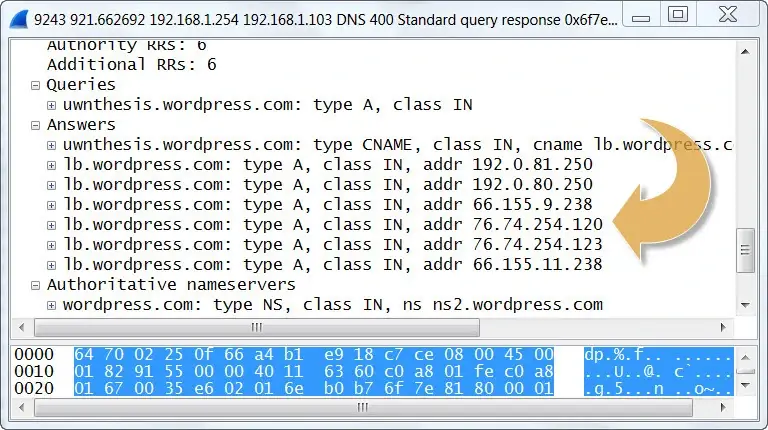
WinDump is the Windows port of tcpdump, the classic command‑line packet capture and analysis utility. It relies on the WinPcap (or Npcap) capture library and is released under a BSD‑style license.
Key features
- Command‑line packet capture: WinDump can watch, diagnose, and save network traffic according to complex rules.
- Compatibility with tcpdump: It accepts the same syntax as tcpdump, making it familiar to Unix tool users.
- Wireless support: WinDump can capture 802.11b/g traffic when used with Riverbed’s AirPcap adapter.
- Free software: It is free and released under a BSD‑style license.
Pros
- Lightweight and scriptable; runs in a terminal without a GUI.
- No cost and minimal installation (just WinPcap/Npcap drivers).
Cons
- The project has not seen updates since 2018; the website lists support up to Windows Vista. Users on Windows 11 need to install Npcap and run it with administrator privileges.
- Command‑line only; steep learning curve for beginners.
Ideal for: Experienced administrators who need a quick, scriptable way to capture packets on Windows or who are already familiar with tcpdump syntax.
Windows compatibility: Official documentation lists support for Windows 95 through Vista, though community members have run it on newer versions using Npcap drivers.
Pricing and license: Free; BSD license.
Also Read: 9 Best Free Network Mapping Software for Windows
Conclusion
Modern network troubleshooting and security investigations on Windows require tools that can reliably open and parse PCAP files. Wireshark remains the gold standard for protocol analysis, while NetworkMiner and BruteShark excel at forensic extraction.
Sniffnet and PRTG provide beginner‑friendly monitoring and visualization, and Pktmon offers built‑in capture capabilities for diagnosing Windows stack issues.
Brimcap/Zui demonstrates where the field is heading by combining PCAP data with logs and supporting query language. Choose the tool that matches your technical comfort level and the depth of analysis you need.
Frequently Asked Questions (FAQs)
1. Why should I analyze PCAP files on Windows 11?
Modern Windows systems provide built‑in and third‑party tools for capturing and analyzing network traffic. PCAP analysis helps you troubleshoot slow applications, detect malware, and verify compliance. Since Windows 11 is now widely deployed, choosing tools that support it ensures better compatibility and future security updates.
2. Are these tools really free?
Yes. Wireshark, Sniffnet, BruteShark, Pktmon, Brimcap and WinDump are completely free. NetworkMiner and PRTG offer free editions; the former has an optional professional license, while the latter is free for up to 100 sensors.
3. Do I need administrator privileges to capture traffic?
Most packet capture tools require admin or root privileges to access network interfaces. On Windows, you may need to run Wireshark or WinDump as an administrator and install capture drivers (Npcap). PRTG and Sniffnet handle driver installation during setup.
4. What format should I choose – PCAP or PCAPNG?
PCAPNG is the modern format that supports more metadata (interfaces, comments, name resolution). Tools like Wireshark, NetworkMiner, and Pktmon support both. When possible, choose PCAPNG for richer information.
About Himanshu Tyagi
At CodeItBro, I help professionals, marketers, and aspiring technologists bridge the gap between curiosity and confidence in coding and automation. With a dedication to clarity and impact, my work focuses on turning beginner hesitation into actionable results. From clear tutorials on Python and AI tools to practical insights for working with modern stacks, I publish genuine learning experiences that empower you to deploy real solutions—without getting lost in jargon. Join me as we build a smarter tech-muscle together.