Create Hilarious Celebrity Face Swap Videos in Seconds

Our guides are based on hands-on testing and verified sources. Each article is reviewed for accuracy and updated regularly to ensure current, reliable information.Read our editorial policy.
Have you ever fantasized about swinging Moljnr like Thor? Dance like Jennifer Lopez or rap at the speed of Eminem? If yes, then by using REFACE, all your fantasies about your favorite celebs can come true!
How? Simply by using the REFACE mobile app. With REFACE, you can create hilarious, ridiculous, and bizarre celebrity face-swap videos and memes. The app uses deep fake technology. Thus, the face swap videos look as realistic as possible.
As a huge Eminem fan, I used REFACE to create a funny GIF, as shown below. The GIF looks genuine, and the app perfectly mimics the facial expressions.

In this blog, we will fully explore REFACE and how you can use it to create funny celebrity videos and GIFs by swapping your faces.
Do note that the above GIF was edited and optimized before uploading. The original GIF generated by the app is of much better quality.
Before moving ahead, check out these best mugshot creator apps if you want to see some of your friends or loved ones in jail. 😛
Let’s get started.
How to Create Celebrities’ Face Swap Videos
REFACE is available for both Android and iOS users. The best part is that you don’t have to edit images to create face swap videos of famous personalities.
The app automatically does all the heavy lifting, and you must choose a video or GIF from its interface.
Follow these 3 simple steps to create deep fake celebrity videos to have fun with your friends and colleagues.
Steps to create hilarious face swap videos with celebrities
Step 1: Download the app for Android or iOS using the links at the end of this article. Opening REFACE for the first time will ask you to take a portrait selfie or choose a photo from your gallery.
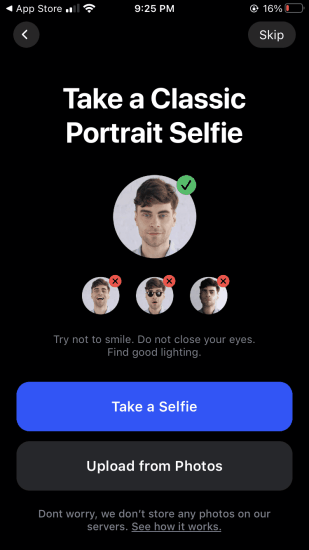
Whatever option you choose, please note that REFACE will automatically detect the face in the image and use it to create celebrity face swap videos.
Step 2: After selecting the photo, you will see the app’s main interface, as shown in the screenshot below.

You can choose a famous clip from the main interface to create a face-swap celebrity video or search for your favorite celebrity.
As I wanted to create a face swap video with Eminem, I searched for it. Interestingly, I found many popular clips and GIFs of the Rap God and chose a hilarious scene to create a GIF.
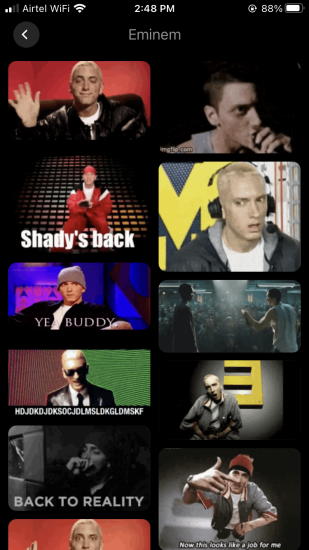
Step 3: After selecting a celebrity video or GIF, the REFACE app will prompt you to continue.
Tap the Reface button, and the app will do all the magic behind the scenes. In 10-15 seconds, you will see a real celebrity face swap video.

Step 4: Save the face swap video on your phone and post it directly to your social media profiles.

Tap the Save button to save the celebrity face swap video as a video or GIF file on your device.
As I created a GIF, I shared it with my friends and laughed.
Limitations of the free version
- Watermarks on the GIFs and videos
- Annoying ads
- Upload your photos, videos, or GIFs to create face-swap videos
Final Words
REFACE makes creating funny celebrity face swap videos easy. If you want to see yourself doing crazy stuff, then REFACE is a must-have app. Please let me know your experience with the app in the comments section below.
About Himanshu Tyagi
At CodeItBro, I help professionals, marketers, and aspiring technologists bridge the gap between curiosity and confidence in coding and automation. With a dedication to clarity and impact, my work focuses on turning beginner hesitation into actionable results. From clear tutorials on Python and AI tools to practical insights for working with modern stacks, I publish genuine learning experiences that empower you to deploy real solutions—without getting lost in jargon. Join me as we build a smarter tech-muscle together.