10 Best Breadboard Simulator Software for Windows

Our guides are based on hands-on testing and verified sources. Each article is reviewed for accuracy and updated regularly to ensure current, reliable information.Read our editorial policy.
Designing a reliable circuit takes time and patience. Breadboard simulator software solves two problems at once—it lets you build a circuit in a graphical environment and then run the simulation without buying real parts.
A good software can show how signals flow through a virtual breadboard, highlight errors, and even export a schematic for manufacturing. Most importantly, beginners need tools that run smoothly on modern versions of Windows.
This guide compares ten actively maintained breadboard simulators that are compatible with Windows 11 and Windows 10.
What is a Breadboard Simulator?
A breadboard is a reusable platform for prototyping electronic circuits. Instead of soldering, you plug components into interconnected holes to build a circuit. A breadboard simulator reproduces that experience on a computer.
You select parts from a library, place them on a virtual board, and then run the simulation to test how the circuit behaves. Because no physical hardware is at risk, you can experiment freely and see instant results.
Best Breadboard Simulator Software for Windows 11 & 10
Below are ten actively maintained simulators for Windows 11 and Windows 10. Each entry follows a consistent structure, so you can compare them easily.
1. Fritzing
Summary: An open‑source prototyping suite with breadboard, schematic, and PCB views.
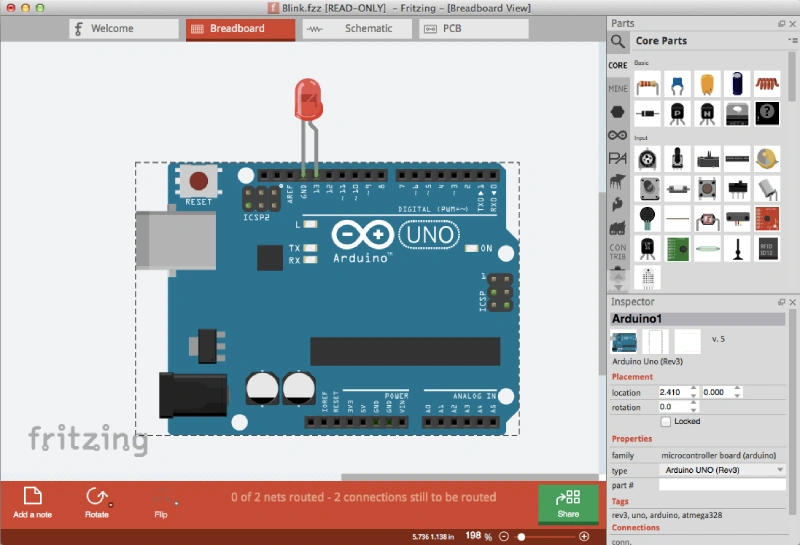
Fritzing is a long‑standing favorite for beginners and educators. It combines a realistic breadboard view with schematic and PCB layouts, allowing you to document your prototype and order a custom PCB through Fritzing Fab.
The latest release (v1.0.6) was tested on Windows 11 (25H2/24H2) and Windows 10. Downloads are funded by a small contribution (about €8 or €25 for businesses).
Key Features
- Breadboard and schematic views: Switch between a realistic breadboard layout and a schematic diagram.
- Extensive parts library: Includes Adafruit parts bin and generic ICs with multiline labels.
- PCB design and ordering: Design and order custom PCBs directly via Fritzing Fab.
- Cross‑platform: runs on Windows, macOS, and Linux; Windows version supports x86 processors on Windows 10/11 and ARM processors on Windows 11 24H2.
- Community and tutorials: active forums and project sharing encourage learning.
Pros
- Friendly drag‑and‑drop interface suitable for beginners.
- Three coordinated views (breadboard, schematic, PCB) help visualize designs.
- Extensive parts library with contributions from major vendors.
- Multi-language support and active development (latest release: October 21, 2025).
Cons
- Download requires a small contribution; the source code is free, but building from source is complex.
- Large projects may feel slow despite recent performance improvements.
Ideal For: Students and hobbyists who want an easy tool for creating breadboard layouts and ordering PCBs.
Windows Compatibility: Tested on Windows 11 25H2/24H2 and Windows 10 for x86 CPUs.
Pricing and License: Open source (GPL). A download requires a contribution (approximately €8 for personal use and €25 for business).
Official Website: fritzing.org
Suggested Read: 10 Best Free 3D CAD Programs for Windows
2. LTspice (Analog Devices)
Summary: A free SPICE‑based analog circuit simulator from Analog Devices.
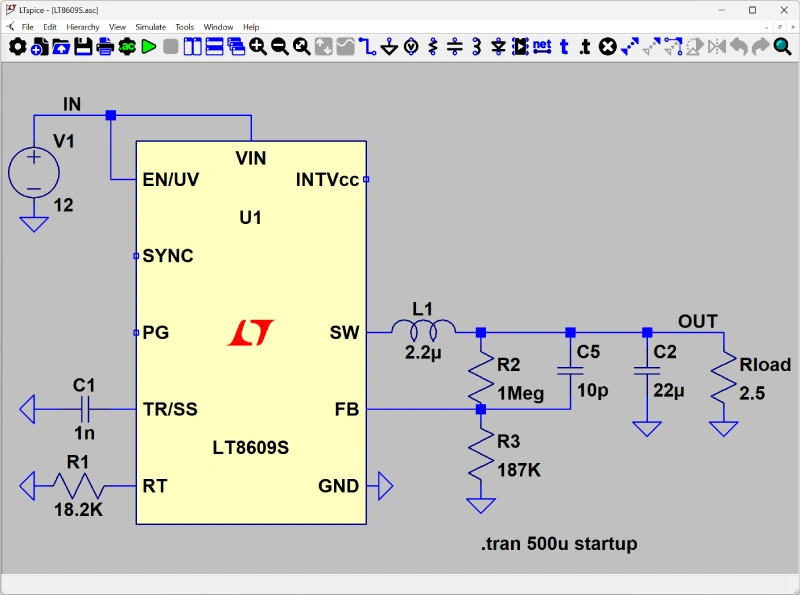
LTspice is a professional-grade simulator that offers unlimited schematic capture and waveform viewing capabilities. It runs natively on Windows 10/11 (64‑bit) and Windows 11 ARM64.
The software features advanced SPICE models, making it a popular choice for power electronics and analog design.
Key Features
- SPICE engine: includes a fast, free analog circuit simulator with unlimited nodes.
- Schematic capture and waveform viewer: An integrated environment to draw circuits and analyze results.
- Extensive component library: Includes operational amplifiers, MOSFET models, and switching regulators.
- Cross‑platform support: Runs on Windows 10/11 (x64), Windows 11 ARM64, and macOS.
- Community resources, including active user forums and examples, facilitate learning.
Pros
- Accurate SPICE simulations suitable for professional design.
- Completely free with no node limits.
- Supports advanced devices, including MOSFETs and switching regulators.
Cons
- No breadboard view; aimed at schematic‑level simulation rather than pictorial layouts.
- Steeper learning curve than purely graphical tools.
Ideal For: Engineers and power‑electronics hobbyists who need an accurate SPICE simulation rather than a pictorial breadboard.
Windows Compatibility: Windows 10/11 (64-bit) and Windows 11 (ARM64).
Pricing and License: Free proprietary software.
Official Website: analog.com/ltspice
3. Virtual Breadboard (VBB)
Summary: Modern Windows Store app for designing and virtualizing breadboard circuits with optional subscriptions.
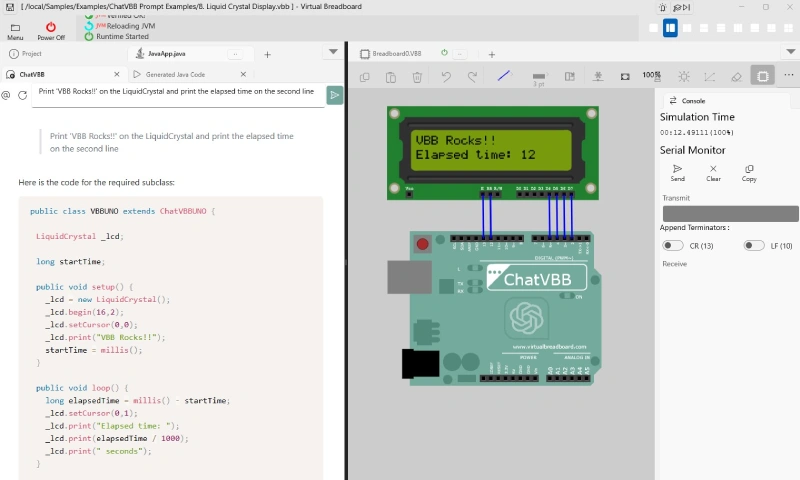
Virtual Breadboard (VBB) is a Windows Store application designed for students and hobbyists. It replicates a breadboard environment and includes interactive features such as powering on the circuit and viewing outputs.
The manual notes that VBB is a modern Windows Store app, emphasizing that it provides a safe environment for experimenting with circuit designs.
The app integrates ChatVBB, a ChatGPT‑powered assistant, to help with code and troubleshooting. The basic design tools are free, but virtualization features require a subscription.
Key Features
- Virtualization: Simulate breadboard circuits interactively by powering on the board.
- Design sheets: Organize designs into multiple sheets, including menus for quick save and examples.
- ChatVBB integration: integrated ChatGPT assistant helps generate code and convert between platforms.
- Subscription model: layout and design components are free; virtualization of specific components requires a subscription.
Pros
- Modern interface designed for Windows 11 and 10 users.
- A safe environment for learning electronics, featuring interactive power-on simulation.
- Built‑in assistant to accelerate learning and code generation.
Cons
- Some virtualization features are locked behind a paid subscription.
- Windows‑only; no cross‑platform support.
Ideal For: Windows users seeking a visual breadboard experience with built‑in tutorials and AI assistance.
Windows Compatibility: Windows Store app for Windows 10 and Windows 11.
Pricing and License: Free for layout; subscription required for advanced virtualization.
Official Website: virtualbreadboard.com
4. EasyEDA
Summary: Cloud‑based and desktop circuit design platform with integrated SPICE simulation.
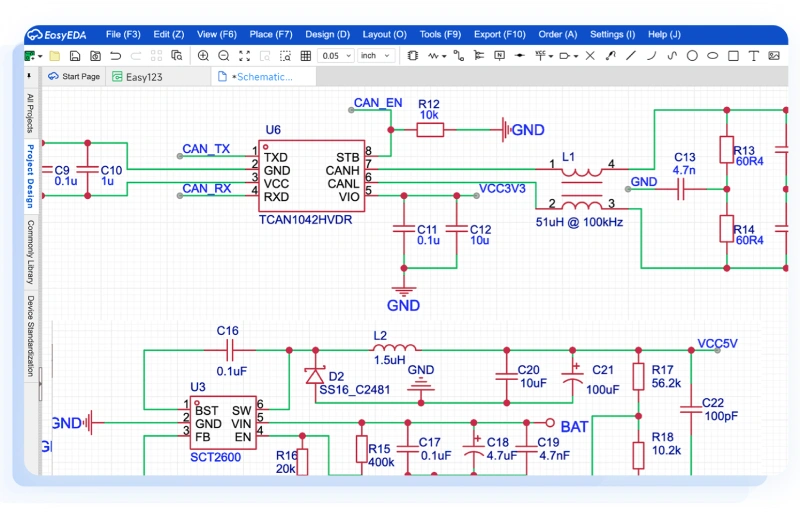
EasyEDA is both an online and a desktop application for designing circuits, performing SPICE simulations, and laying out PCBs. The Windows client supports Windows 10 and above (x64 and ARM64) and also offers a Windows 7 version.
EasyEDA provides schematic capture, hierarchical design, simulation, and direct export of bills of materials (BOM). Users can save projects locally or in the cloud.
Key Features
- Schematic capture: draw circuits with hierarchical design and multi‑sheet support.
- SPICE simulation: run mixed‑mode simulations directly in the editor.
- PCB layout: design PCBs with design‑rule checks (DRC) and generate Gerber files.
- Cloud and desktop versions: collaborate via the cloud or work offline with the Windows client.
- Cross‑platform: available for Windows, macOS, and Linux.
Pros
- All‑in‑one design environment: schematic, simulation, and PCB layout.
- Cloud project storage with local backup.
- Free to use; premium options provide additional storage and team collaboration features.
Cons
- The browser version may feel sluggish with very large projects.
- Learning curve for hierarchical projects.
Ideal For: Hobbyists and small teams needing cloud collaboration and integrated simulation/PCB design.
Windows Compatibility: Windows 10 and above (x64 & ARM64) with a separate Windows 7 version.
Pricing and License: Free with optional premium plans.
Official Website: easyeda.com
Also Check: 5 Best Apps to Create Music with Virtual MIDI Keyboards
5. CircuitLab
Summary: An in-browser circuit simulator and schematic editor that requires no installation.
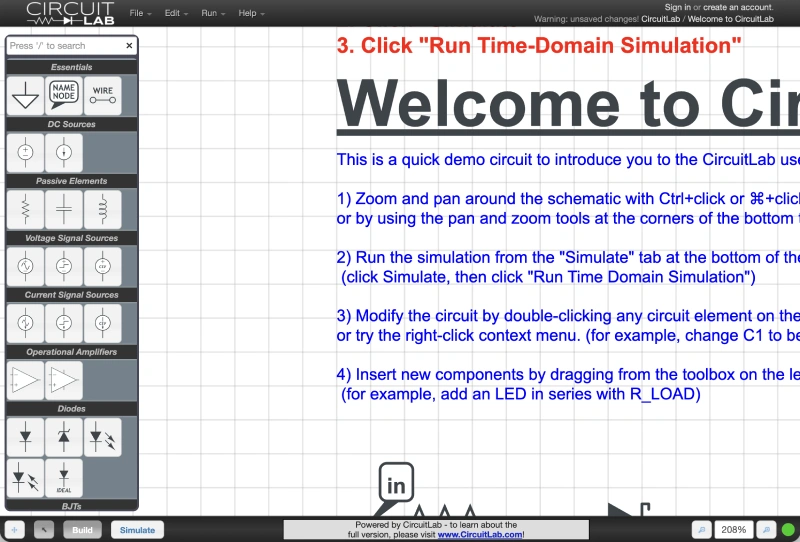
CircuitLab is an online tool for building and simulating circuits. It utilizes a human-friendly schematic editor with both analog and digital simulation capabilities.
Because it runs entirely in a web browser, there is nothing to install. The tool supports Chrome and Firefox officially and works with JavaScript enabled. Users can design circuits and simulate them right in the browser.
Key Features
- Browser‑based: design and simulate circuits without installing software.
- Mixed‑mode simulation: supports analog and digital components with SPICE‑like models.
- Human-friendly editor: Easy-Wire mode simplifies component connection.
- Unit‑aware expressions: evaluate expressions with units and automatically calculate values.
- Export options: generate professional schematic PDFs and share designs.
Pros
- Runs on any modern browser; no installation required.
- Suitable for quick simulations and schematic drafting.
- Mixed‑mode simulation with interactive waveform plots.
Cons
- Requires an internet connection; offline use is limited.
- The free tier has schematic size restrictions; a paid subscription unlocks larger projects.
Ideal For: Beginners needing a quick and easy online simulator or professionals sketching simple circuits.
Windows Compatibility: Works in Chrome or Firefox on Windows 10/11 with JavaScript enabled.
Pricing and License: A free tier is available; paid plans unlock additional features.
Official Website: circuitlab.com
6. Logisim‑evolution
Summary: Open‑source digital logic simulator with chronogram and HDL support.
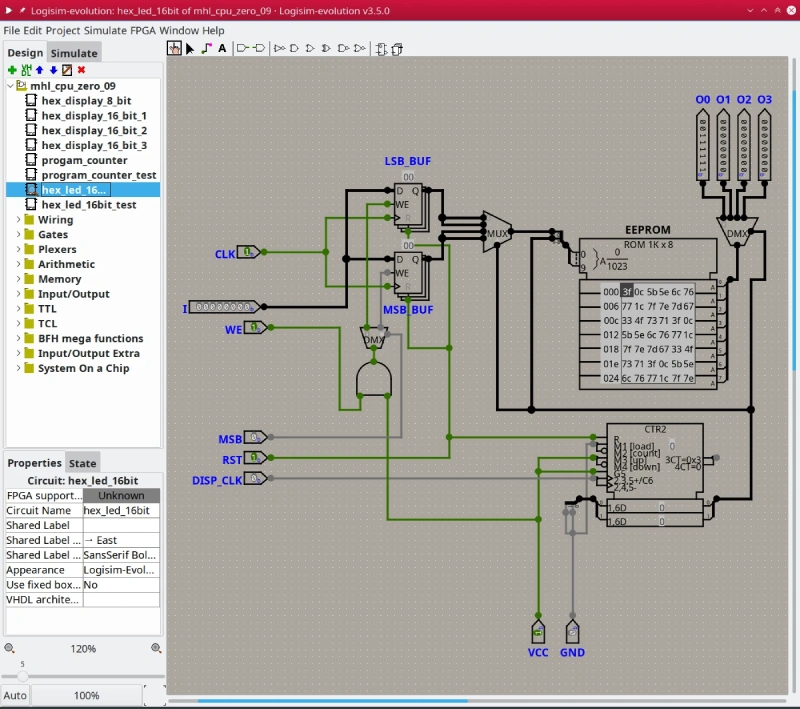
Logisim‑evolution is an educational tool for designing and simulating digital logic circuits. It provides an easy-to-use circuit designer, simulation of logic devices, and timing diagrams (chronograms).
The program also supports VHDL components and allows the loading of custom libraries. Pre‑built packages are available for Windows (Intel and ARM), macOS, and Linux. Logisim‑evolution requires Java 21 or newer to run.
Key Features
- Interactive logic simulation: design logic circuits with gates, flip‑flops, and memory.
- Chronogram tool: visualize timing diagrams for signals.
- Hardware Simulation: Simulate circuits on real boards and utilize VHDL components.
- Custom libraries: import or create additional components to extend functionality.
- Multi-language support: The interface is available in numerous languages.
Pros
- Free and open source; ideal for teaching digital electronics.
- Cross‑platform packages for Windows, macOS, and Linux.
- Supports VHDL and simulation on physical boards.
Cons
- Focused on digital logic; not suitable for analog circuits.
- Requires Java installation (Java 21 or newer).
Ideal For: Students studying digital logic and educators demonstrating sequential circuits.
Windows Compatibility: Windows packages available for Intel and ARM processors; requires Java 21 or newer.
Pricing and License: Free, open‑source software (GPL).
Official Website: github.com/logisim-evolution
7. Falstad Circuit Simulator (CircuitJS)
Summary: Interactive, browser‑based circuit simulator with animated schematics.
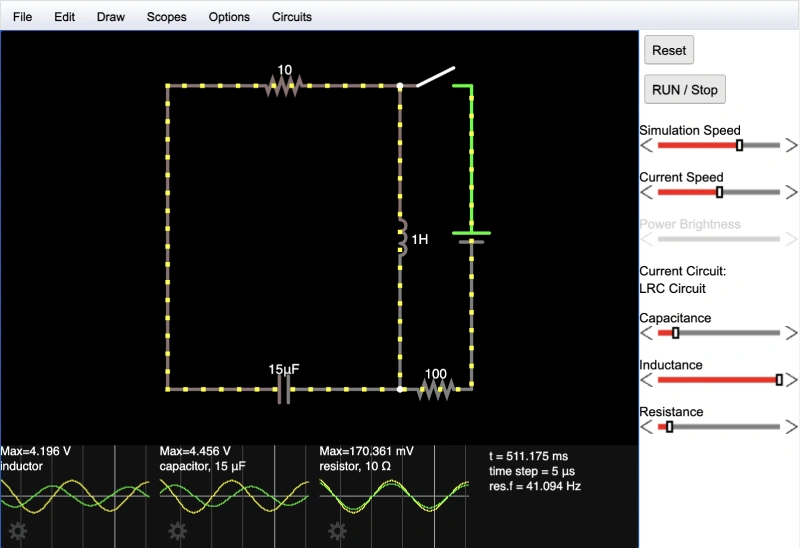
This tool, often referred to as CircuitJS or the Falstad simulator, shows animated schematics of circuits with color‑coded voltages. You can click components to toggle switches or right‑click to edit parameters.
The “Circuits” menu lists numerous sample circuits, ranging from basic RC networks to op-amp oscillators. An offline Windows package (circuitjs1-win.zip) is available for download.
Key Features
- Animated schematics: real‑time color coding of voltages makes it easy to visualize how circuits operate.
- Interactive components: click to toggle switches, edit values, or add new components.
- Sample library: built‑in library of example circuits helps users learn various concepts.
- Offline version: downloadable Windows package for offline use.
Pros
- Free and accessible online; no login required.
- Excellent for teaching basic electronics with visual feedback.
- The offline version ensures usability even without an internet connection.
Cons
- Limited to relatively simple circuits; not suitable for complex PCB design.
- User interface is functional but dated.
Ideal for: Learners who need an interactive visualization of analog circuits and educators who demonstrate fundamental concepts.
Windows Compatibility: Runs in any modern browser and is also available as an offline Windows package (circuitjs1-win.zip).
Pricing and License: Free, open source.
Official Website: falstad.com/circuit
Also Read: 12 Best FFmpeg Windows GUI Tools – No Command Line
8. Qucs‑S
Summary: SPICE‑compatible simulation front‑end supporting multiple free solvers.
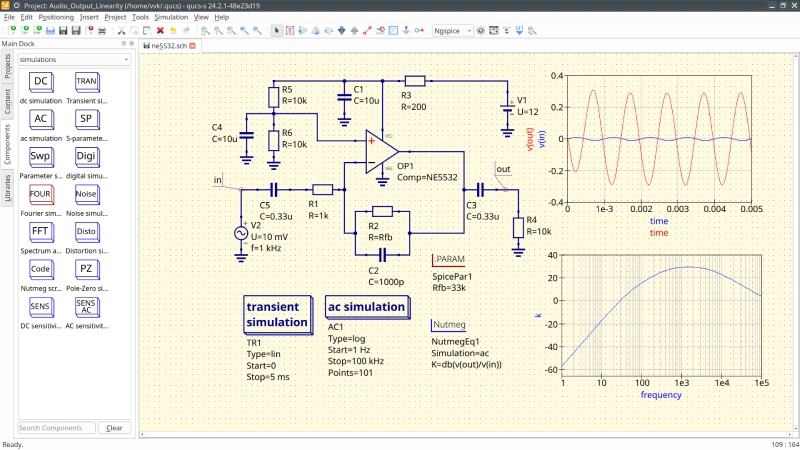
Qucs‑S is an offshoot of the original Qucs project that integrates several open‑source simulation engines (Ngspice, Qucsator, and Xyce).
The latest release (25.2.0) provides a Windows installer and portable version, demonstrating active development.
Qucs‑S is not itself a simulator; it serves as a graphical front‑end that passes circuits to one of the selected engines. It supports many analysis types, including AC, DC, transient, S‑parameter, and FFT.
Key Features
- Modular simulation: choose between Ngspice, Qucsator, or Xyce as the backend.
- Advanced analyses: AC, DC, transient, S‑parameters, noise analysis, and harmonic balance.
- Rich component library: includes passive and active devices, digital primitives, and RF components.
- Cross‑platform: packages available for Windows (installer and portable), Linux, and macOS.
Pros
- Free and open source, it combines powerful SPICE engines under a unified interface.
- Supports advanced simulation types not found in many free tools.
- Active development with multiple releases in 2025.
Cons
- No breadboard pictorial view; focused on schematic simulation.
- Configuration can be complex due to the presence of multiple engines.
Ideal For: Users needing sophisticated SPICE analyses and willing to configure backend systems.
Windows Compatibility: Windows installer and portable package available.
Pricing and License: Free and open source.
Official Website:
9. Proteus Design Suite
Summary: Commercial suite for schematic capture, simulation, and PCB design with microcontroller co‑simulation.
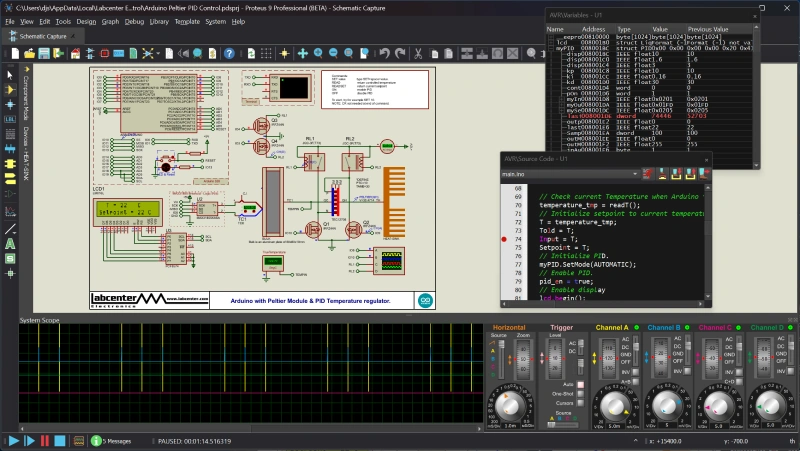
Proteus from Labcenter Electronics combines schematic capture and PCB layout with a built‑in VSM (Virtual System Modelling) simulator. The developer describes it as easy to use yet powerful for rapid design and simulation.
Proteus enables designers to simulate microcontrollers, such as Arduino and Raspberry Pi, within their circuits and includes Visual Designer and IoT Builder tools. The suite is a native Windows application.
Key Features
- Integrated design: schematic capture, simulation, and PCB layout in one package.
- VSM simulation: Simulate embedded microcontrollers and debug code in a circuit.
- Visual Designer and IoT Builder: Develop Arduino and Raspberry Pi projects with drag-and-drop programming.
- AI‑assisted tools: features like ProPilot and ProTutor assist with auto‑routing and design guidance.
- 64-bit architecture: Proteus 9 introduced a 64-bit version with a managed library workflow and live graphing.
Pros
- Professional‑grade tool used in education and industry.
- Microcontroller co‑simulation speeds up firmware development.
- Comprehensive library and support for IoT design.
Cons
- Commercial software with a relatively high licensing cost; no free version is available.
- Windows‑only.
Ideal for: Professional engineers, educators, and advanced hobbyists who require microcontroller simulation and PCB design in a single environment.
Windows Compatibility: Native Windows application; 64‑bit version available.
Pricing and License: Proprietary; various editions (Starter, Professional, Enterprise) with perpetual licenses and optional upgrades.
Official Website: labcenter.com
10. Tinkercad Circuits
Summary: Beginner‑friendly web app for building and simulating simple circuits with microcontroller support.
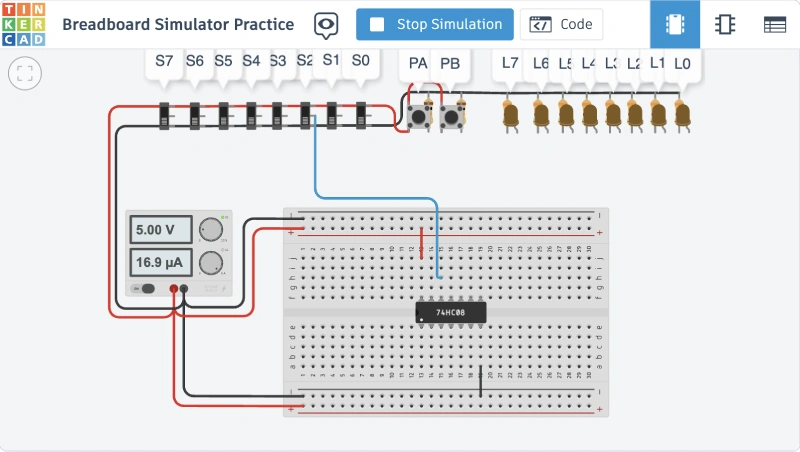
Tinkercad is a free web application from Autodesk that offers 3D design, electronics, and coding capabilities. Its Circuits module lets users build circuits on a virtual breadboard, drag components from a parts panel, start a simulation, and even program Arduino boards.
The Maker.pro tutorial shows how to place a 555 timer IC on a breadboard, connect resistors and LEDs, and run the simulation.
It also notes that you can switch to an Arduino view, write code using a block editor or text editor, and export the design to Eagle.
Key Features
- Browser‑based breadboard: drag‑and‑drop parts onto a virtual breadboard; connections are auto‑routed.
- Simulation: start/stop simulation with one click; monitor voltages and currents; test logic.
- Arduino integration: program Arduino using visual blocks or C++ code.
- Export to Eagle: export schematic for further PCB design.
- Free and accessible: runs in any modern browser.
Pros
- Extremely easy to use; ideal for beginners learning electronics.
- Web‑based; no installation needed.
- Supports microcontroller coding with block and text editors.
Cons
- Limited component library; cannot add custom parts.
- Not suitable for large or professional PCB projects.
Ideal For: Complete beginners, educators, and anyone needing a quick Arduino or breadboard simulator.
Windows Compatibility: Runs in any modern browser on Windows 11 or Windows 10.
Pricing and License: Free (Autodesk account required).
Official Website: tinkercad.com
Suggested Read: 20 Best Free Movie Organizer Software to Manage Your Collection
How to Choose the Right BreadBoard Simulator
Choosing the right tool depends on what you want to learn or build:
- For pure beginners: Tinkercad Circuits and Fritzing offer the most approachable experience with visual breadboard layouts and minimal setup. They also support Arduino projects.
- For students of digital logic: Logisim‑evolution provides a simple way to design and visualize logic circuits, while CircuitLab’s mixed‑mode capabilities are helpful for both digital and analog assignments.
- For analog or power electronics: LTspice and Qucs‑S deliver accurate SPICE simulations and support complex analyses. Use them when precision matters more than pictorial layouts.
- For microcontroller prototyping: Proteus offers integrated microcontroller co‑simulation, whereas Virtual Breadboard and Tinkercad Circuits let you test code on a virtual board before flashing hardware.
- For collaborative PCB design: EasyEDA’s cloud service and integrated PCB layout are suitable for small teams that need version control and remote access.
Frequently Asked Questions (FAQs)
Can I simulate Arduino circuits with these tools?
Yes. Fritzing, Virtual Breadboard, Proteus, and Tinkercad Circuits all support Arduino boards. Proteus even lets you debug firmware while the circuit is running.
Do I need to install anything to use a breadboard simulator?
Not always. CircuitLab and Tinkercad Circuits run entirely in the browser. Fritzing, LTspice, Virtual Breadboard, Logisim Evolution, Qucs-S, and Proteus require a desktop installation.
Are there any free options?
Yes. Fritzing’s source code is free (although binaries require a small contribution); LTspice, Logisim-evolution, Falstad, Qucs-S, and Tinkercad Circuits are also free. CircuitLab and EasyEDA offer free tiers, with optional paid upgrades available.
Which tool supports Windows 11 on ARM?
Fritzing 1.0.6 supports Windows 11 24H2 on both x86 and ARM CPUs. LTspice also provides an ARM64 version. Logisim‑evolution offers packages for ARM processors.
About Himanshu Tyagi
At CodeItBro, I help professionals, marketers, and aspiring technologists bridge the gap between curiosity and confidence in coding and automation. With a dedication to clarity and impact, my work focuses on turning beginner hesitation into actionable results. From clear tutorials on Python and AI tools to practical insights for working with modern stacks, I publish genuine learning experiences that empower you to deploy real solutions—without getting lost in jargon. Join me as we build a smarter tech-muscle together.