23 Ways to Stop Hitting Claude Usage Limits

Our guides are based on hands-on testing and verified sources. Each article is reviewed for accuracy and updated regularly to ensure current, reliable information.Read our editorial policy.
You’re paying for Claude. But you’re burning through credits like someone who leaves every light on in the house.
Hit the usage limit by 2 PM. Stare at the “you’ve reached your limit” screen. Consider upgrading. Upgrade. Hit the limit again. The problem was never the plan.
Below are 23 habits that actually move the needle — ranked from the ones most people don’t know to the ones everyone knows but skips. Pick three this week. The rest can wait.
Why Your Credits Disappear (The One Thing You Need to Understand First)
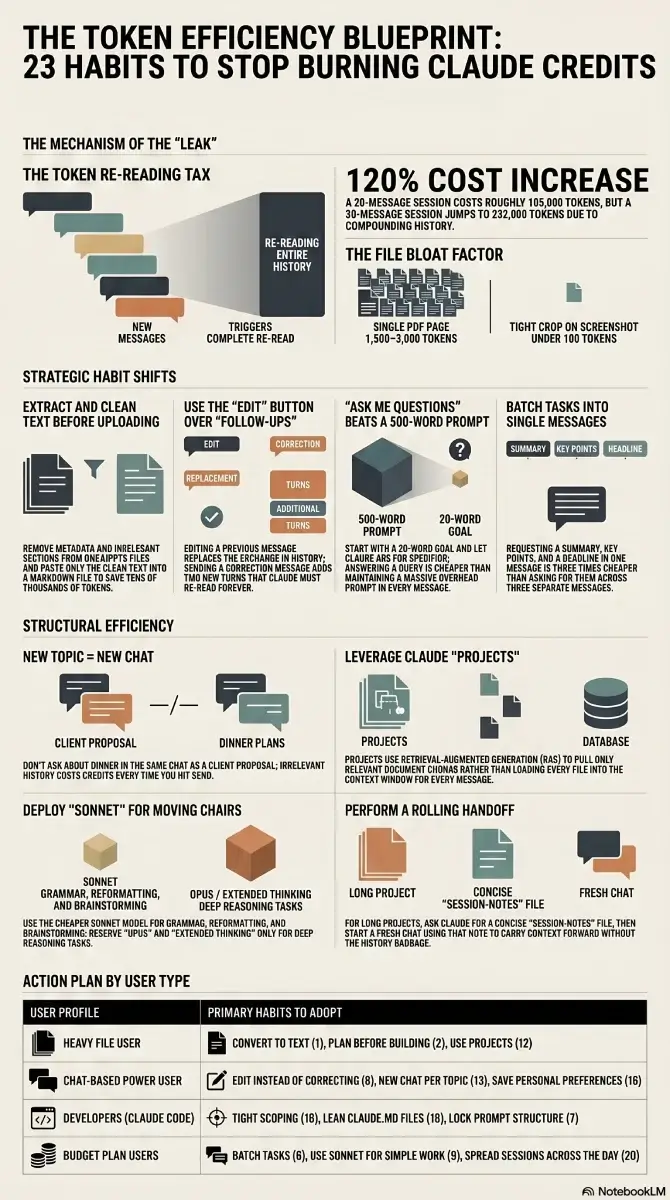
A token is roughly one word. Simple enough. Here’s the part that trips people up: every time you send a message, Claude re-reads your entire conversation from the top. Every message. Every response. All of it, every time.
Message 1 is cheap. Message 30 means Claude just re-processed 29 full exchanges before it even looks at what you asked. That’s the leak. Everything below is about plugging it.
The Habits Most People Miss
1. Convert Files Before You Upload Them
A single PDF page runs 1,500–3,000 tokens. A 1,000×1,000 screenshot clocks around 1,300. DOCX and PPTX files carry metadata bloat you can’t even see.
The fix is tedious but effective: extract the text before uploading. Paste only the relevant sections into a plain text or Markdown file. If you regularly work with file conversions, browser-based tools handle most formats without installing anything. Crop screenshots tight — a well-cropped image can drop from 1,300 tokens to under 100.
If you upload the same 15-page PDF across four chats, you just burned 180,000+ tokens on content that could have been 2,000 tokens of clean text. Four times. For the same document.
2. Plan in Chat First. Create the File After
File creation — spreadsheets, docs, presentations — costs more than regular chat. A lot more. So don’t jump straight into building. Spend the cheap chat turns figuring out exactly what you want: structure, sections, assumptions. Then, once you know precisely what you’re asking for, move to file creation and say “build this.”
Thinking in chat is cheap. Rebuilding a file three times because the structure was wrong is not.
3. “Ask Me Questions” Beats a 500-Word Prompt
Every word of your prompt gets re-read on every subsequent message. A 500-word prompt means 500 tokens of context overhead for the rest of the conversation.
A better default: write 15–20 words and let Claude ask you what it needs. “I want to [task] to achieve [goal]. Ask me questions before you start.” Answering a clarifying question costs almost nothing. If you want to go deeper on how prompting affects output quality, our guide on vibe coding prompting best practices covers a lot of the same principles.
4. Speak Your Prompts Instead of Typing Them
Counterintuitive one. Voice-to-text tools actually reduce token usage even though they produce longer input. Why? Because when you type, you shortcut. “Make it better.” “Change the tone.” Vague. Claude guesses wrong. You send a correction. Claude re-reads everything again.
When you speak, you front-load context naturally: “The tone is too stiff — I want it to sound like I’m messaging a friend who runs a 200-person company. Keep the data, make it casual, only redo section 2.” One message. Correct output. No correction loop.
5. Point at the Broken Section, Not the Whole Output
Section 3 is wrong. Don’t say “redo the report.” Say “only redo section 3 — keep everything else.”
A full redo regenerates 2,000 tokens of output that was already correct. You’re paying to re-create content you already have.
Same logic applies to verbosity: add “No commentary. No explanations. Just the output.” to your prompts when you know what you want. Every “Happy to help! Here’s what I did…” is output tokens you’re paying for.
6. One Message, Multiple Tasks
Three separate messages = three full context reloads. One message with three tasks = one reload.
“Summarize this article” → “Now list the main points” → “Now suggest a headline” is three times more expensive than “Summarize this article, list the main points, and suggest a headline.” And the single-message version usually produces better output anyway — Claude has the full picture at once.
7. Lock Your Prompt Structure and Only Swap the Variable Part
Anthropic’s prompt caching means frequently repeated prompt patterns get partially cached. The practical version: build one structural template for each recurring task type, and only change what’s inside the brackets.
If your wrapper is identical every time — “I want to [task] to [success criteria]. Ask me questions before you start.” — you’re working with cached structure instead of re-tokenizing it from scratch on each call.
8. The Edit Button Exists for a Reason
In Claude Chat, you can click Edit on any previous message, change it, and regenerate. The old exchange disappears. It doesn’t stack on the history.
Most people send “No, I meant…” as a new message instead. That adds two turns to the conversation — your correction plus Claude’s new response — and now both get re-read on every future message. Edit replaces; follow-ups accumulate. Use Edit.
The Obvious Ones You’re Probably Still Getting Wrong
9. Stop Using Opus for Everything
Grammar checks, reformatting, short answers, brainstorming — Sonnet does this at a fraction of the cost. Opus with extended thinking is for hard problems that need deep reasoning. Don’t deploy heavy machinery to move a chair.
A simple rule: if Claude answers in under 30 seconds, it probably didn’t need Opus. Switch before you start — it’s two clicks. If you’re evaluating AI-powered coding assistants more broadly, the model tier question comes up there too — same logic applies.
10. Trim Your Context Files to Under 2,000 Words
Project context files and system documents get read before every single task. A 22,000-word file (and yes, people have these) means thousands of tokens burned before you’ve typed a single word of your actual request. Every session.
Cut them to under 2,000 words. At the end of a session, ask Claude: “Write a session-notes file with key decisions and next steps.” Start the next session with “Read session-notes first.” You carry forward what matters without re-uploading your entire knowledge base each time.
11. A 30-Message Session Costs Roughly 230,000 Tokens
A 20-message session runs around 105,000 tokens. A 30-message session runs around 232,000. The reason: as the conversation grows, the proportion of tokens spent re-reading history versus generating new output keeps shifting in the wrong direction.
Long conversations are expensive not because you’re asking harder questions — it’s because the re-read overhead compounds with every message.
When things go sideways in a long session, don’t keep pushing forward. Go back to the earliest useful message and restart from there. If the whole conversation is a loss, open a fresh chat with a one-line summary of what you need.
Proactively summarize and restart every 15–20 messages, even when things are going well. Ask Claude to write a summary of key decisions, copy it, and start fresh. It takes 90 seconds and saves you from hitting the wall later.
12. Use Projects Instead of Re-Uploading the Same Files
Every time you upload a PDF to a new chat, Claude re-tokenizes the whole thing. Five chats, five full reads of the same document.
Claude Projects cache uploaded files. Every conversation inside that project references them without re-burning tokens. On paid plans, Projects also use retrieval-augmented generation — Claude pulls only the relevant chunks of your documents instead of loading everything into context.
If you regularly work with contracts, research papers, or brand guides, this change alone can cut your per-session token cost significantly.
13. Every New Topic Gets a New Chat
You asked Claude about a LinkedIn post. Then a client proposal. Then what to cook for dinner. Same chat. Now Claude re-reads the LinkedIn and the proposal every time it thinks about your pasta.
That’s not dramatic — it’s just how the context window works. Old messages have no value for the new topic and they cost tokens every single time. New topic, new chat.
14. Turn Off What You’re Not Using
Web search, connectors, and extended thinking all add tokens to every response whether you asked for them or not. If you’re writing your own content, turn off Search. Grammar check? Turn off Extended Thinking.
Default everything off. Turn features on per task. And when you do use connectors like Google Drive or Slack, be specific: “Search Slack from the last 7 days for messages about the Q2 launch” loads far fewer results — and far fewer tokens — than “search Slack for anything about launches.” This matters especially when you’re using Claude for content and SEO work where sessions tend to run long.
15. Don’t Upload Files That Aren’t Needed for the Task
There’s a version of this where someone puts 50 files into a project folder “just in case Claude needs them.” Claude reads them. All of them. Just in case.
If it’s not needed for the task at hand, it shouldn’t be in context. For tasks that don’t touch files at all — a quick email draft, a short answer — select zero folders. Zero context loaded means tokens saved before you type a word.
16. Set Up User Preferences Once, Stop Re-Explaining Yourself
Without saved preferences, you burn 3–5 messages per new chat just setting up who you are and how you work. Multiply that across a week of sessions.
Go to Settings → General → Personal Preferences in Claude. Write it once. Also set up a Style (Concise works well as a default, or write a custom one). These persist across chats and cost nothing — they don’t eat your context window the way pasted instructions do.
17. Use Scheduled Tasks for Anything Recurring
Weekly reports, content digests, research summaries — if you’re running these manually in growing sessions, you’re wasting tokens on the setup every single time. Claude supports scheduled tasks. Set it once, let it run. For the kind of recurring content workflows where this helps most, our roundup of online AI editor tools covers some complementary options worth combining with Claude.
18. Give Claude Code a Tight Scope
Claude Code is genuinely powerful, but it’s also the fastest way to burn through your limit if you leave the scope open. It goes wide by default — reads directories, explores files, runs checks across the whole project.
Be surgical. “Create a bar chart from this CSV showing monthly revenue for 2025. Save it as chart.png.” That’s the prompt. No room to explore means no tokens wasted on exploration. If you’re newer to working with Claude Code, our Claude Code vibe coding guide walks through scoping tasks effectively from the start.
19. Use CLAUDE.md for Recurring Claude Code Instructions
Claude Code reads a CLAUDE.md file before every task. Put your permanent context there — preferred folder, language, naming conventions. Write it once, done.
Keep it short. Anthropic explicitly warns that a bloated CLAUDE.md causes Claude to deprioritize your actual instructions. Anything task-specific or occasional should go into Skills instead. CLAUDE.md runs every time. Skills load on demand. If you want to understand how this fits into a broader vibe coding workflow, what is vibe coding is a good starting point.
20. Spread Sessions Across the Day
Claude’s usage limit uses a rolling 5-hour window. Blow through your entire limit before noon, and you’ve wasted most of your daily capacity. By the time the afternoon rolls around, most of that usage has already expired and you’re sitting on an empty tank.
Morning, afternoon, evening. Three sessions. By the time session 3 starts, session 1 has mostly cleared. This matters a lot more on the $20/month plan than on higher tiers, but it applies either way.
21. Don’t Use Claude for Things Claude Is Actually Bad At
Claude cannot generate images. Spending five messages trying to describe a visual to get a text-based workaround is five messages of context and tokens down the drain — on a task with a zero percent success rate. Switch to a dedicated AI image generator instead.
Real-time search is another weak spot. Claude’s knowledge has a cutoff date, and even with web search enabled it’s slower and less current than tools built specifically for that. Matching the tool to the task isn’t just a quality decision — it’s a token efficiency decision too.
Two More That Don’t Fit Neatly Anywhere
22. Use a Rolling Handoff Note for Long Projects
For projects that span multiple sessions — not just recurring tasks but actual ongoing work — end each session by asking Claude to write a concise handoff note: decisions made, what’s next, any open questions. Copy it. Start the next session with it as the first message.
You carry the context forward without hauling the full session history into a new chat. This works well alongside vibe coding tools where multi-session context is a real constraint.
23. Match the Prompt Format to What You Actually Want
If you want a list, ask for a list. If you want two sentences, say two sentences. Claude defaults to verbose — it’s designed to be thorough. That’s useful when you need it, expensive when you don’t.
Adding “be concise” to your prompts consistently cuts response length and output token cost. If you find yourself typing it on every request, add it to your User Preferences once and stop thinking about it.
For AI writing tools that give you more format control out of the box, our AI paragraph generator and AI sentence rewriter on CodeItBro are worth bookmarking.
Where to Actually Start
Pick based on where you’re spending time, not what sounds most interesting:
- Heavy file user (PDFs, docs, uploads): Start with tips 1, 2, and 12. Convert before uploading using our file converter tools, plan before building, use Projects.
- Mostly chat-based work: Tips 8, 13, and 16. Edit instead of correcting, new chat per topic, set up persistent preferences once.
- Developers using Claude Code: Tips 18, 19, and 7. Tight scope, a lean CLAUDE.md, and consistent prompt structure. Our Claude Code guide goes deeper on all three.
- On the $20 plan and hitting limits regularly: Tips 6, 9, and 20. Batch tasks, switch to cheaper models for simple work, spread sessions through the day.
About Himanshu Tyagi
At CodeItBro, I help professionals, marketers, and aspiring technologists bridge the gap between curiosity and confidence in coding and automation. With a dedication to clarity and impact, my work focuses on turning beginner hesitation into actionable results. From clear tutorials on Python and AI tools to practical insights for working with modern stacks, I publish genuine learning experiences that empower you to deploy real solutions—without getting lost in jargon. Join me as we build a smarter tech-muscle together.