Best GIF Color Changer (3 Free Sites to Colorize GIFs)

Our guides are based on hands-on testing and verified sources. Each article is reviewed for accuracy and updated regularly to ensure current, reliable information.Read our editorial policy.
A “GIF color changer” is a tool or program that allows you to change the colors of a GIF (Graphics Interchange Format) file.
This can be useful for modifying an existing GIF to match a website’s color scheme or to make the colors more vibrant.
Select the GIF file you want to modify to use a GIF color changer. Then, you can choose the colors you want to change and the new colors. The GIF color changer will create a new GIF version with the modified colors.
Some popular options include GIMP, Adobe Photoshop, and online tools like EZGIF.com and gifs.com.
Using a GIF color changer is typically a simple process, and many of these tools offer user-friendly interfaces that make it easy to change the colors of a GIF.
Also Read: 12 Best Free GIF Meme Maker Websites
3 Best GIF Color Changer Websites
Have you ever felt the need to change the color of a GIF online or modify its background color?
The good news is that after creating a GIF, its appearance is not locked, and various websites and online applications can enable you to change its colors quickly and effortlessly.
In this article, we will explore 3 GIF color changer websites that you can use immediately to change the colors of your favorite GIFs.
1. EZGIF
This viral and widely used GIF tool helps you create / Edit GIF animations and convert them to other formats. It provides extensive options to crop, rotate, reverse, split, resize GIFs, and apply filters and effects.
EZGIF is also very useful in applying color presets like Grayscale, Sepia, Tint, Negative, etc., to GIF files.
Additionally, you can change the background color of the GIF animation, replace it with transparency, and colorize the GIF by offering adjustments to its Hue, Saturation, and Lightness (HSL).
The following are the steps involved in this process
1. Navigate to EZGIF by clicking this link and ‘Effects.’
2. Click on ‘Choose file’ and upload a GIF file from your system or paste its URL if it is available on a website.
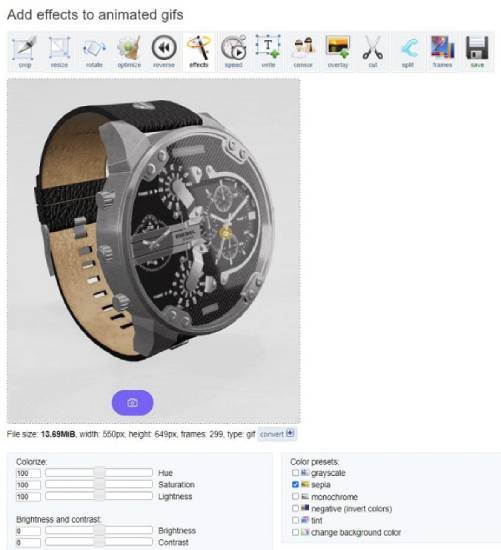
3. Select the respective checkbox to apply the color presets. Alternatively, adjust the sliders to modify the GIF file’s HSL values and the Brightness and Contrast.
4. You can enable any specific checkbox to apply a particular filter.
5. Click on the ‘Apply selected’ button at the bottom of the page to apply the changes and view them in real-time.
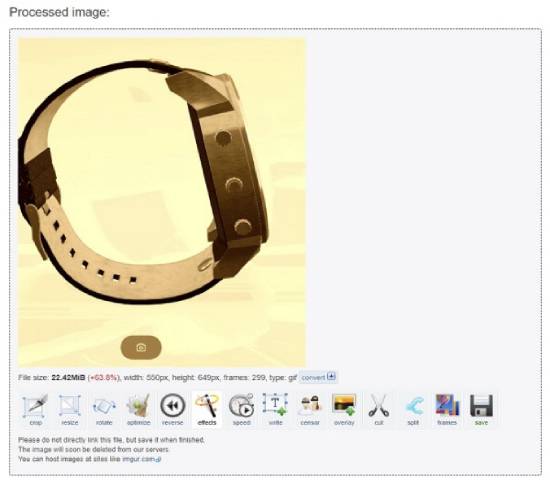
6. Download the modified GIF file by clicking the “Save” icon.
Also Read: 3 Best Boomerang GIF Maker Websites
2. Lunapic
Lunapic is another famous and professional online image editor that offers excellent support for PNG, JPG, GIF, and other image files.
It comprises numerous editing tools for modifying and resizing GIF files and altering their color, making the background transparent, applying Blur, and more.
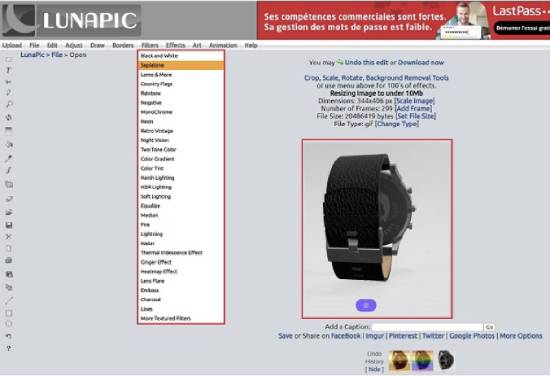
Lunapic allows you to change the GIF color to black and white, Retro Vintage, Sepia tone, Neon lines, and more. The following steps detail the procedure for the same:
1. Visit Lunapic by clicking on this link and then clicking on ‘Upload’ at the top left of the page to upload the GIF file you desire to recolor.
2. Click on ‘Filters’ in the menu at the top and then select any filter you wish to apply, such as Black and White, Rainbow, Negative, etc. Once this step is done, you can use the slider to adjust the intensity of the applied Filter.
3. To save the GIF file on your local system, right-click on it and click the “Save image as” option.
Also Read: 5 Best GIF Overlay Websites To Add Images On GIFs
3. Online GIF Tools
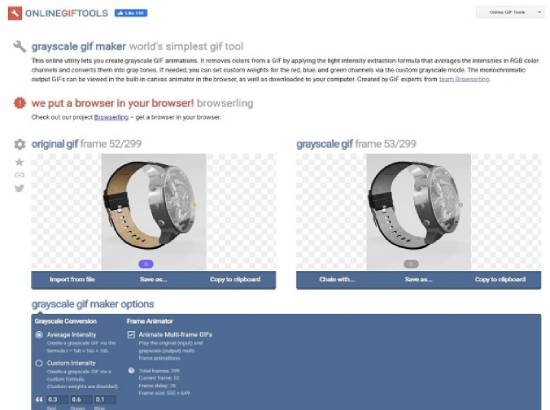
This is the final GIF color tool we will explore in this article. It boasts a good collection of tools for editing GIFs, including those that recolor the GIF, change its background color, reverse/convert GIFs, compress GIF files, and many more.
Also Read: 4 Best GIF Speed Changer Websites [Speed Up Animated GIFs]
The steps below explain the procedure to recolor the GIF:
1. Click here to navigate to Online GIF Tools.
2. Click on ‘Convert a GIF to Grayscale. Drag and drop the GIF file into the box for the original GIF; the output GIF will be immediately displayed in real time.
3. You can change the Average / Custom intensity, etc., using the ‘Grayscale GIF maker options’ below the image display.
4. To download the GIF file, click “Save as” and then click “Download,” then save the file to your local system.
5. Additionally, you can click ‘Fill a Transparent GIF’ on the main page to fill the transparent regions of a GIF file with selected solid colors.
Also Read: 5 Best Online Transparent GIF Maker Websites
Summary
You can try all the tools above to recolor GIFs online and decide carefully which one suits your purpose.
My choice will be the first website we explored above, like EZGIF, to recolor GIF files because its wide-ranging tools and features are remarkable for getting the job done. Please let us know your feelings about the websites we have listed above.
About Himanshu Tyagi
At CodeItBro, I help professionals, marketers, and aspiring technologists bridge the gap between curiosity and confidence in coding and automation. With a dedication to clarity and impact, my work focuses on turning beginner hesitation into actionable results. From clear tutorials on Python and AI tools to practical insights for working with modern stacks, I publish genuine learning experiences that empower you to deploy real solutions—without getting lost in jargon. Join me as we build a smarter tech-muscle together.