Arcads AI Review: Is This the Secret to Viral UGC Ads?

Our guides are based on hands-on testing and verified sources. Each article is reviewed for accuracy and updated regularly to ensure current, reliable information.Read our editorial policy.
If you have ever spent your Sunday night scrolling through Fiverr or Upwork trying to find a UGC creator who does not charge a fortune and can actually deliver a video before your campaign launch on Tuesday, you know the specific brand of stress I am talking about.
For small-business owners, marketers, and developers, the bottleneck is rarely the ideas; it is the execution. Video production has historically been the most expensive and slowest part of the marketing funnel. But as I sat down to put Arcads AI through its paces, I realized the landscape of digital storytelling is shifting from human-dependent logistics to algorithmic-driven velocity.
In this review, I will walk you through my hands-on experience with Arcads AI, evaluate its hyper-realistic actor library, and dive into the economics of why a French startup just raised $16 million to change how you make ads.
| Feature | Arcads AI Specification |
| Core Function | Text-to-Video UGC Ad Generation |
| Target Audience | E-commerce, SaaS, App Studios, Agencies |
| Actor Library | 1,000+ AI Avatars (Pro), 300+ (Creator) |
| Language Support | 30–35+ Languages with regional accents |
| Input Methods | Text-to-Speech (TTS) & Speech-to-Speech (STS) |
| Video Resolution | Up to 1080p HD |
| Pricing | Starts at ~$110/mo for 10 videos |
| Key Differentiator | Ad-focused “casual” realism vs. corporate “polished” look |
The Death of the Traditional Creative Cycle
You have likely heard the term “creative fatigue.” In the world of Meta and TikTok ads, a winning creative usually has a shelf life of about 7 to 14 days before its performance begins to tank.
For you, this means you need a constant stream of fresh hooks, different actors, and localized versions to keep your ROAS (Return on Ad Spend) above water.
Traditionally, this meant shipping products to creators, waiting for them to film, and then iterating on their raw files—a process that is fundamentally unscalable for a small team.
When I first opened the Arcads AI dashboard, I wanted to see if a machine could replicate the “authentic” feel of a person talking to their front-facing camera in their living room.
Unlike corporate tools like Synthesia, which excel at professional presentations, Arcads is built specifically for the direct-response environment.
It is a tool designed for marketers who care about clicks and conversions over cinematic awards.
Also Check: Free Online Video Cutter
What Exactly is Arcads AI?
At its core, Arcads AI is an AI-powered video generation platform that turns text scripts into fully narrated video ads featuring lifelike AI actors. It is operated by Freshr and led by founders Romain Torres and Dylan Fournier.
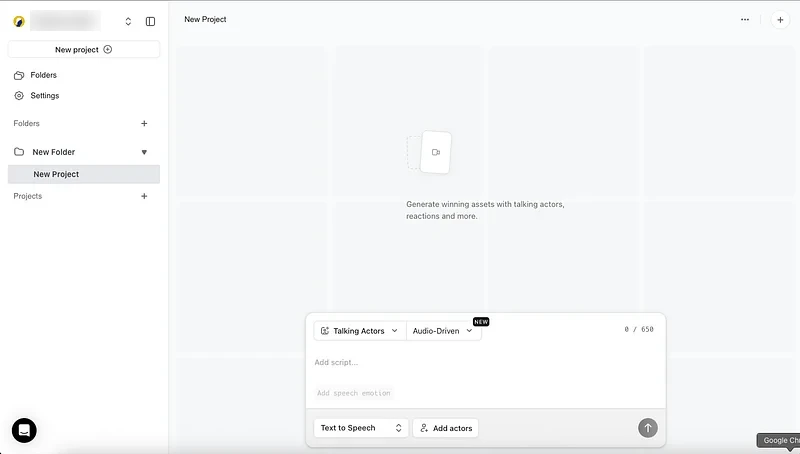
The platform has recently gained significant traction, serving over 6,000 clients and generating roughly 100,000 video assets per month.
In December 2025, they secured a $16 million Seed round led by Eurazeo, with participation from Alpha Intelligence Capital and the Sequoia Scout program.
How to Use It: My Hands-On Workflow
I spent several hours generating ads to understand the nuances of the system. I recommend you follow this specific workflow to maximize your credit efficiency, as each video can cost you roughly $10 to $11, depending on your plan.
Step 1: Project Initialization and Scripting
Once you log in, the interface is refreshingly clean. You start by adding a new project. I found that the “Script” is the most important element.
Since Arcads does not have a built-in AI scriptwriter, I used a combination of ChatGPT and the Arcads “AI Hook Generator” tool, which is available for free in their “Free Tools” section.
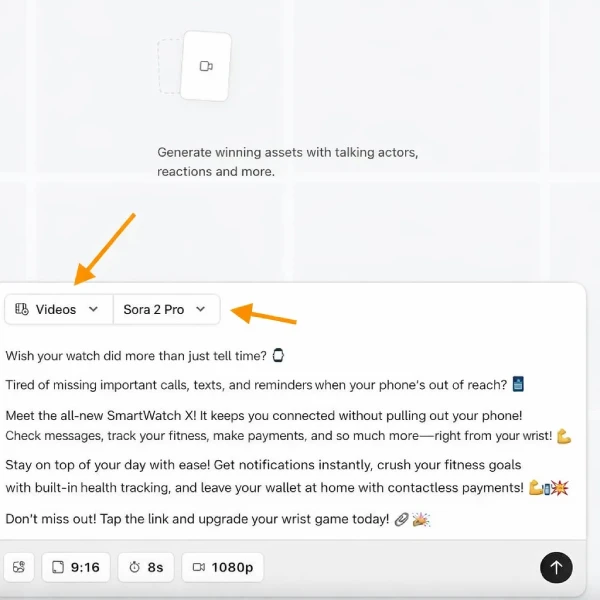
I tested a script for a hypothetical smartwatch using the structure: Hook → Problem → Solution → Benefits → CTA. A pro tip: the AI is incredibly sensitive to punctuation. If you want the actor to sound excited, use exclamation points.
If you want a natural pause for emphasis, use a comma or an ellipsis. The AI’s pitch and tone shift in response to these symbols, allowing you to “direct” the performance without saying a word.
Step 2: Input Method Selection
You have two choices here:
- Text-to-Speech: You paste your text, and the AI handles the voice. This is the fastest method.
- Speech-to-Speech: I found this particularly useful for maintaining brand consistency. You can record yourself speaking into your browser or upload a high-quality audio file. The AI actor will then mirror your exact delivery, including your pauses and emotional inflections.
Step 3: Choosing Your “Face”
This is the fun part. You get to browse a library of over 1,000 actors. I used filters to narrow down my selection by age, gender, skin tone, and environment.
I picked an actor named “Thomas” for my smartwatch ad because he looked like a casual tech enthusiast in a home-office setting.
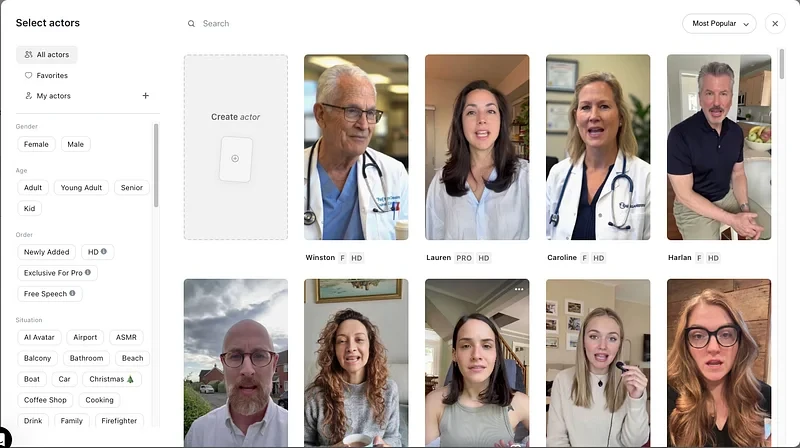
The platform allows you to “Listen back” to how each actor sounds with your specific script before you hit generate.
I cannot stress this enough: always use the preview. You do not want to burn a $10 credit on a voice that doesn’t match your product’s face or vibe.
Step 4: Generation and Export
After confirming your selection, you hit generate. In my tests, the videos (usually 15–30 seconds) took about 5 minutes to render. Once finished, I downloaded a clean 1080p MP4 file.
| Workflow Step | Tool/Action | Time Estimate |
| Research | TikTok Creative Center / FB Ad Library | 15 mins |
| Scripting | ChatGPT + Arcads Hook Generator | 10 mins |
| Selection | Filtering 1,000+ Actors & Voice Preview | 5 mins |
| Rendering | Algorithmic Processing | 5–30 mins |
| Editing | CapCut / Premiere Pro (Essential) | 20 mins |
Suggested Read: Convert MP4 Video to AVI
Arcads AI Key Features: Beyond Simple Lip-Syncing
Arcads AI is more than just a “talking head” generator; it includes several specialized features that solve e-commerce-specific problems.
1. Emotion Control and Inflection
You have probably seen AI videos that look like they are being narrated by a hostage—stiff, unblinking, and robotic. Arcads addresses this with “Full Emotion Control”.
By adding emotion tags or selecting tones like “persuasive,” “friendly,” or “excited,” you can change the actor’s facial geometry and hand gestures.
This is a game-changer for performance marketing because you can test a “fear-based” hook against a “benefit-driven” hook using the same actor and script.
2. Multi-Video Generation (Bulk Mode)
For developers and agency owners, speed is the ultimate currency. Arcads allows you to input multiple scripts or attach multiple actors to the same script in one go.
I used this to generate five different versions of a hook to see which actor’s face performed better in my Meta A/B tests. This “Testing Velocity” is the core value proposition of the platform.
3. Specialized Ad Formats
I was impressed by the “Unboxing POV” and “Show Your App” features.
- Unboxing POV: You upload an image of your product, and the AI generates a video of the actor “unboxing” it in a chosen setting, like an outdoor park or a kitchen.
- Show Your App: The actor holds up their phone and points to your landing page or app interface. For those of you in SaaS, this is how you build trust without needing a professional camera setup.
4. Global Reach: Localization
If you are looking to scale globally, you will appreciate the support for over 35 languages. I tested a script in Spanish and German, and the lip-syncing remained surprisingly tight. This allows you to take a winning US ad and launch it in Europe or Latin America in minutes, not weeks.
Arcads AI Pros and Cons
I want to be direct with you: this tool is not perfect. AI video is still an evolving technology, and you need to understand the limitations before you invest.
Pros
- Insane Speed: You can go from an idea to a generated video asset in under 10 minutes.
- Massive Library: With 1,000+ actors, you can match your ad’s persona to almost any target demographic.
- Cost Efficiency: While $11/video sounds high for software, it is a bargain compared to $150/video for a human creator.
- Emotionally Resonant: The ability to control “Happiness” or “Excitement” tags prevents the stiff “robotic” feel found in cheaper alternatives.
- A/B Testing Power: Generating 10 versions of a hook simultaneously is the only way to scale paid ads in 2026.
Cons
- No Built-in Editor: This is my biggest gripe. You cannot add captions, music, or B-roll inside Arcads. You must use an external tool like CapCut.
- Price Barrier: The $110/month entry price is steep for solopreneurs who just want to “try it out”.
- Punctuation Learning Curve: You have to learn how to “write for the AI” to get the right vocal delivery.
- Uncanny Valley: While the lip-syncing is the best I’ve seen, long scripts (over 30 seconds) can sometimes start to feel “off” or slightly robotic.
Arcads AI Pricing
Pricing transparency is not Arcads’ strong suit. You won’t find a clear pricing page on their home screen; you usually have to sign up or request a quote to see the tiers.1
Based on current data from early 2026, here is what you can expect to pay 7:
| Plan | Monthly Cost (Approx.) | Video Credits | Cost Per Video |
| Starter | $110 | 10 | $11.00 |
| Creator | $220 | 20 | $11.00 |
| Pro | Custom | Custom + API | Varies |
| Enterprise | Custom | Custom + Support | Varies |
For most small businesses, the Starter Plan is the logical entry point. If you are an agency running dozens of accounts, you will likely need the Pro/Enterprise tiers to access the API and to qualify for higher-volume discounts.
Note that credits typically roll over if you stay on a paid plan, which is a nice touch if you have a slow month.
Alternatives to Arcads AI
Depending on your specific needs, you might find that a different tool fits your workflow better. I have compared the top contenders in 2026 below.
1. HeyGen: The Professional Choice
If you are making corporate training videos or LinkedIn “thought leadership” content, HeyGen is superior.
It offers better in-app editing and even more languages (175+). However, their avatars often look “too professional” for TikTok, which can kill your conversion rates if you’re looking for that raw UGC feel.
2. Creatify AI: The Automation King
Creatify specializes in “URL-to-Video”. You paste a Shopify link, and it generates an entire ad with B-roll, captions, and an AI actor.
It is cheaper ($19–$49/mo) and faster for high-volume testing, but the actor quality and lip-syncing aren’t quite as realistic as Arcads.
3. Synthesia: The Enterprise Leader
Synthesia is the gold standard for large organizations needing L&D (Learning and Development) content.
It is highly secure and ethical, but its avatars feel very “corporate” and stiff.9 It is not recommended for high-velocity social media ad testing.
Comparison Table for Marketers
| Tool | Starting Price | Best For | Realism | Workflow |
| Arcads AI | $110 | Viral Social Ads | High | Asset only |
| Creatify AI | $19 | High-Volume E-com | Medium | Full automation |
| HeyGen | $29 | Corporate/Explainer | High | Professional |
| Zeely AI | $29 | Performance Ad Launch | Medium | Integrated Ads |
| Argil | $27 | Personal Branding | Medium | Creative Partner |
Is Arcads AI Worth It?
After testing the platform and analyzing the market data, I can give you a clear answer: Yes, but only if you are running paid ads.
If you are a YouTuber or a casual content creator, the $110/month price tag and the lack of editing tools will frustrate you. You would be better off with InVideo or CapCut’s free AI features.36
However, if you are a performance marketer or a small-business owner spending at least $1,000/month on Meta or TikTok ads, Arcads AI will pay for itself in a single week.
The ability to test 10 different hooks across five different demographics in the time it takes to get a cup of coffee is an unfair advantage that your competitors probably haven’t figured out yet.
About Himanshu Tyagi
At CodeItBro, I help professionals, marketers, and aspiring technologists bridge the gap between curiosity and confidence in coding and automation. With a dedication to clarity and impact, my work focuses on turning beginner hesitation into actionable results. From clear tutorials on Python and AI tools to practical insights for working with modern stacks, I publish genuine learning experiences that empower you to deploy real solutions—without getting lost in jargon. Join me as we build a smarter tech-muscle together.