Download Instagram Firefox: How to Save Photos Using Context Menu

Our guides are based on hands-on testing and verified sources. Each article is reviewed for accuracy and updated regularly to ensure current, reliable information.Read our editorial policy.
This tutorial explains how to download Instagram photos in Firefox using the context menu.
Using the method in this tutorial, you can save or download a post from Instagram right in the Firefox context menu. The only downside of the technique is that it doesn’t let you download Instagram stories.
To download Instagram posts in Firefox, we will use a free add-on named RightClickOnInstagram.
This Firefox add-on will add the “Save Image As…” option to the context menu. While this option is available by default on most sites on the internet, Instagram has disabled it.
Thus, it prevents users from downloading Instagram photos. So, this method will be helpful if you want to save Instagram photos to your desktop.
Also Read: How to Unsave on Instagram: Remove All Saved Posts Fast
How to Download Instagram Photos in Firefox (Right-Click Method)

Let’s now see the steps to download Instagram posts using the context menu in Firefox.
Visit the link at the end of this tutorial and click the Add to Firefox button.

As soon as you click the Add to Firefox button, you will see a notification box at the top-left of your Firefox browser, as shown below.
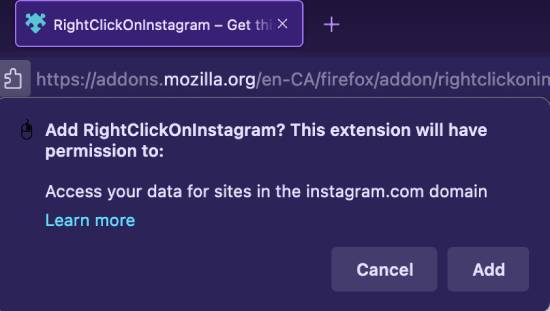
Click on the Add button to move ahead. Firefox will install this add-on. In the next step, click the Okay button to start using RightClickOnInstagram.
Now, open Instagram, and you can download any photo by choosing the “Save Image As…” option in the context menu, as shown below.
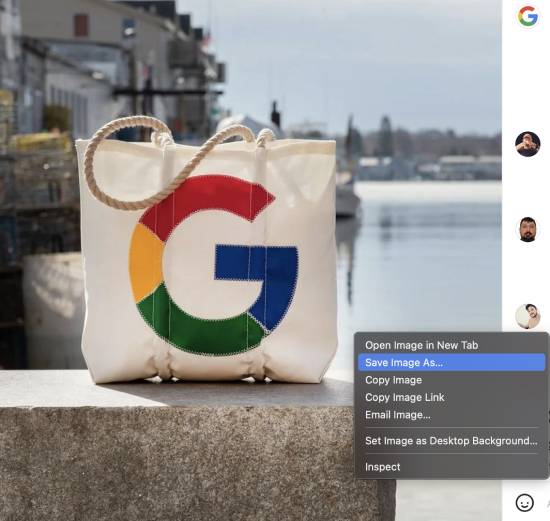
Please note that you will first have to open the Instagram post and then right-click on it to get the option to save the photo.
Congrats! You can download Instagram photos in Firefox using its context menu.
Also Read: 10 Best Free Hashtag Maker Tools for Instagram Growth
Wrapping Up
As of 2022, Instagram is home to 1.3 billion users worldwide, and most users share aesthetically pleasing photos across various categories.
While there are many add-ons available for downloading Instagram posts, none allow you to do so using the context menu. We shared a simple method to download Instagram photos in Firefox using the context menu in this tutorial.
Download and install the RightClickOnInstagram Firefox add-on to get the “Save Image As…” option in the context menu of the Firefox browser. We hope you will find this tutorial helpful. Subscribe to our newsletter to get such updates straight to your inbox.
Get RightClickOnInstagram.
Also Read:
About Himanshu Tyagi
At CodeItBro, I help professionals, marketers, and aspiring technologists bridge the gap between curiosity and confidence in coding and automation. With a dedication to clarity and impact, my work focuses on turning beginner hesitation into actionable results. From clear tutorials on Python and AI tools to practical insights for working with modern stacks, I publish genuine learning experiences that empower you to deploy real solutions—without getting lost in jargon. Join me as we build a smarter tech-muscle together.