Free Yoda Voice Generator Tools — Turn Text into Yoda Speech

Our guides are based on hands-on testing and verified sources. Each article is reviewed for accuracy and updated regularly to ensure current, reliable information.Read our editorial policy.
Are you a fan of Star Wars who’s been searching for a way to create authentic Yoda voiceovers for your content? Or maybe you’re just looking to have some fun and experiment with the wise Jedi master’s distinctive voice?
Well, you’re in luck! In this blog post, we’ve compiled a comprehensive list of the 5 best Yoda voice generator websites and online text-to-speech software options available today.
We’ve covered you, from free web-based tools to advanced software programs. So, let’s dive in and explore the best ways to channel your inner Yoda!
Yoda is one of the most beloved characters in the Star Wars franchise. His unique syntax, voice, and speech have made him an iconic character that has been imitated by many fans worldwide.
If you want to recreate Yoda’s famous lines or create your own dialogue with a similar style, then free online Yoda Voice Generators are just what you need!
Also Read: 4 Best Free SpongeBob Text-to-Speech Generator Websites [Updated]
Best Yoda Voice Generator Websites
This section will cover the 5 best free Yoda voice generator websites. Each of these websites has its unique set of features, so please take the time to check all of them out before making a final selection.
Let’s dive in!
1. Uberduck
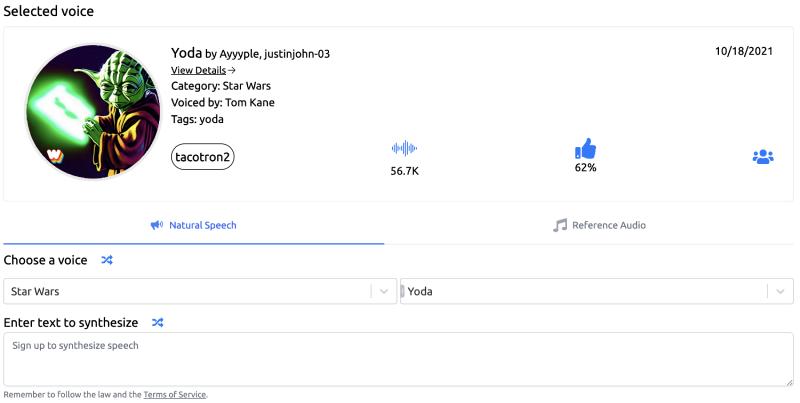
Uberduck is a free Yoda voice generator website that uses powerful Text-to-speech (TTS) engines to generate the audio output of your text in Yoda’s voice.
Its easy-to-use interface makes it simple to use – all you have to do is select ‘Star Wars’ from the dropdown list under ‘Select a Category’ and then choose ‘Yoda’ as your desired Voice option from the following dropdown menu.
Once this step is complete, paste any text generated by The Yoda Speak Generator on their website into Uberduck’s box, provided for input data, before clicking Synthesize. After some time processing behind the scenes, click the Play button once the conversion process is complete.
Features:
- Easy user interface
- Uses TTS Engines
- Option available to download/share a WAV format file publicly or privately
- Generates realistic-sounding outputs using original speech patterns of characters like Darth Vader & Obi-Wan Kenobi, etc
Pros:
- Free service without registration is required.
Cons:
- Limited selection of voices compared to other sites
Also Read: 5 Best Cartoon Characters Voice Generator Text-to-Speech Apps
2. FakeYou
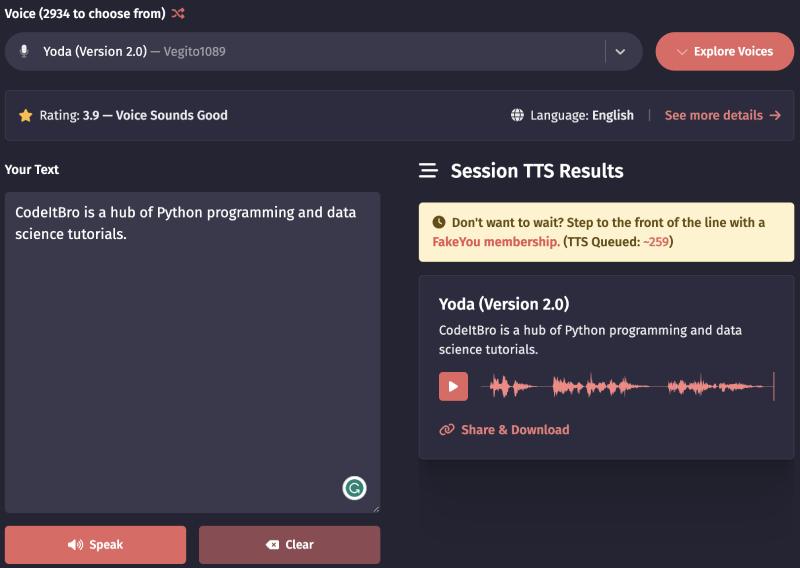
FakeYou is a free Yoda voice generator website that uses powerful Text-to-speech (TTS) engines to generate the audio output of your text in Yoda’s voice.
It has an easy-to-use interface, which makes it simple to use – all you have to do is select ‘Science Fiction’ from the dropdown list under ‘Category/Language’ and then choose ‘Star Wars,’ followed by selecting ‘Yoda (by Vegito 1089)’ as your desired Voice option from the available dropdown menu.
Once this step is complete, paste any text generated into Fakeyou’s box, provided before pressing Speak.
After some time processing behind the scenes, users can click the Play button once the conversion process is complete, allowing them to enjoy hearing their texts spoken with iconic Star Wars characters’ vocal inflections.
Features:
- Easy user interface
- Uses TTS Engines
- Option available: download the WAV format file or share the URL publicly
Pros:
- Free service without registration is required
Cons:
- Limited selection of voices compared to other sites
3. Acapela-box
Acapela Box is another Yoda voice Generator on our list. Its user-friendly interface makes it easy for users to generate and listen to their synthesized speech.
With Acapela Box, you can paste your text into the box on its website and select from two voices (Will – Old Man or Will – Little Creature).
After that, configure the rate of speech and voice shape before clicking the ‘Play’ button, which will start playing automatically once the synthesization process is complete.
However, downloading audio files requires credits that must be purchased beforehand by registered members only.
Features:
- User-friendly Interface
- Configure the Rate of Speech and Voice Shape
Pros:
- Easy usage due to simple UI design
- Free access without registration requirements
Cons:
- No option is available to download audio files except through purchasing credits.
Also Read: 7 Online Tools for Awesome Gamertags (No More Noob123!)
Best Yoda Voice Generator Software for Windows PC
4. VoxBox
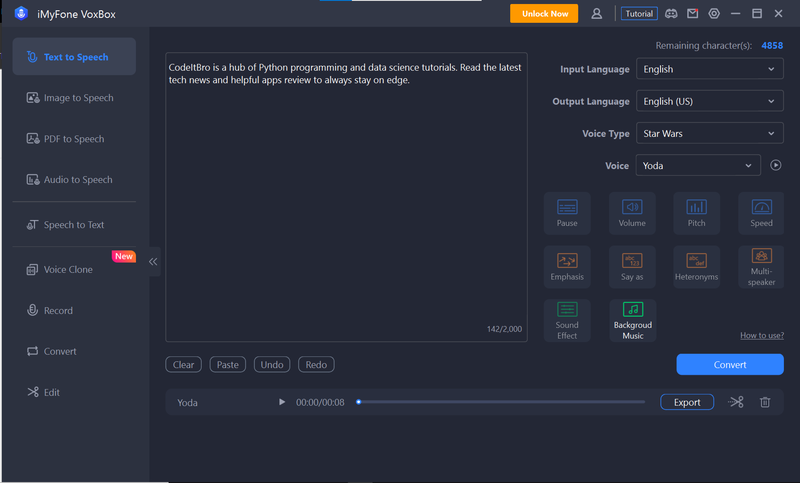
VoxBox is a premium text-to-speech generator for Windows. The best part is that you can use it to generate Yoda’s voice. All you have to do is specify a message and select Yoda as the voice output, and Voxbox will then generate audio with Yoda’s voice.
You can save this audio as an MP3, WAV, or AAC file.
Features of Voxbox:
- Offers more than 30,000 different voices to generate realistic audio
- Multiple functionalities available like STT, convert, edit, TTS, and record
- Record live audio with a mic
- Supports all popular audio and video formats
- Download and convert videos from popular websites like Twitter, Facebook, etc., to audio files
- Edit audio files to separate vocal and instrumental tracks
- Supports multiple languages for text-to-speech generation
Let’s now see how to generate a Yoda voice with Voxbox:
1. Download and install VoxBox using the link above.
2. After that, open Voxbox and type the message in the textbox on its interface.
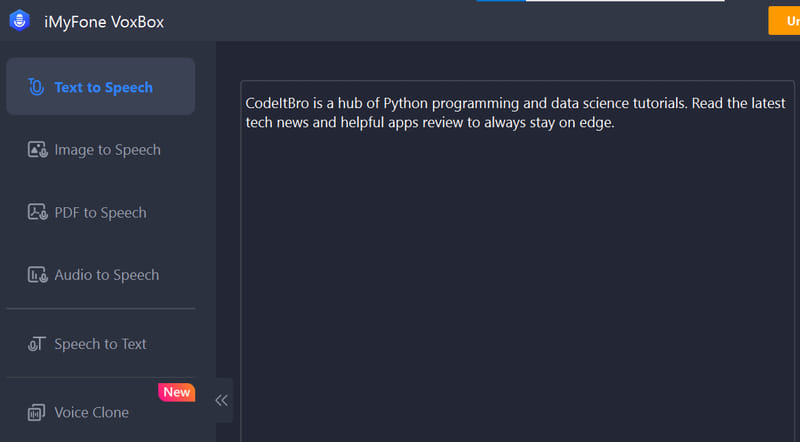
3. Now, from its top-left section, configure output language and voice type options. After selecting your preferred language, select Star Wars from the Voice Type dropdown and Yoda from the Voice option.
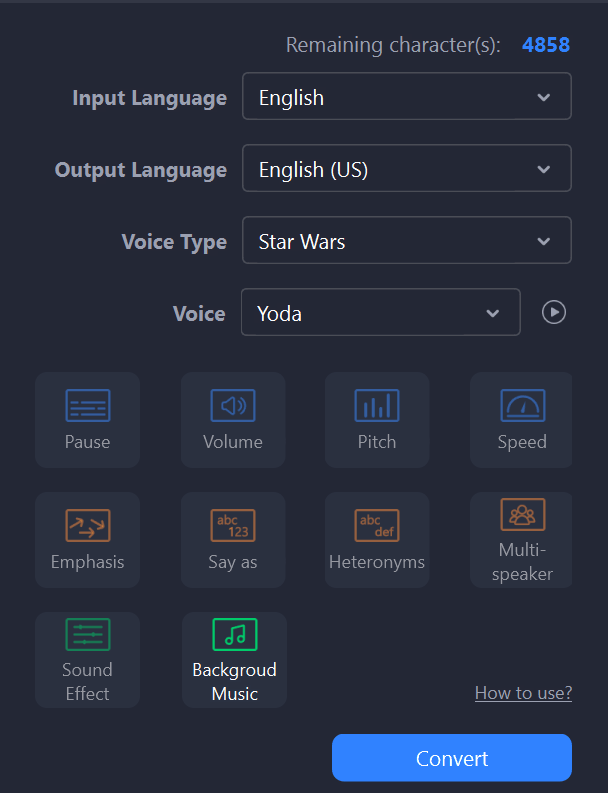
4. In this final step, click the Convert button, and VoxBox will convert your specified text to Yoda’s voice in a few seconds, as shown below.

To save the generated Yoda voice, click on the Export button. After that, a dialog box will appear, as shown in the screenshot below.
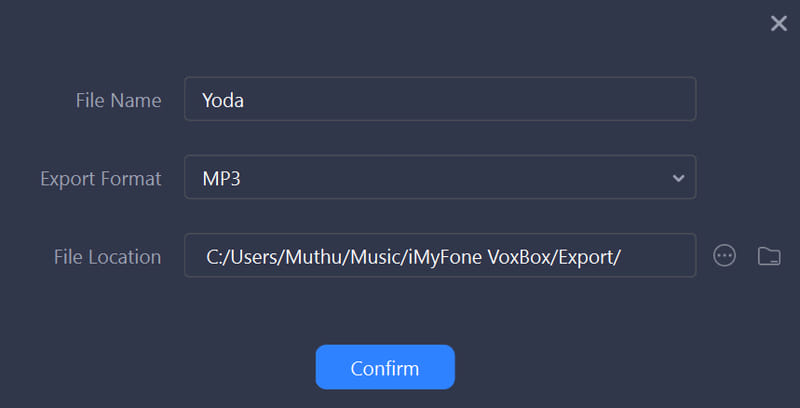
In this dialog box, specify the File Name, Export Format, and File Location. Once you’ve done this, simply click the Confirm button, and VoxBox will save the Yoda voice on your PC.
Pricing:
- Monthly: $14.95
- Yearly: $39.95
- Lifetime: $79.95
5. WooTechy Soundbot
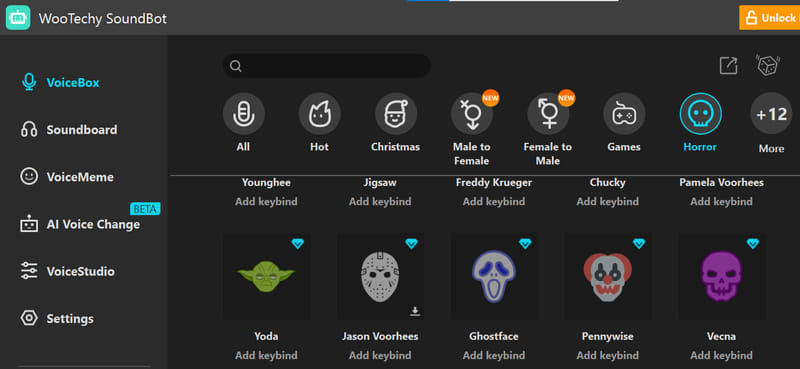
Do you want to change your voice and make it sound like Yoda? If so, WooTechy is the perfect solution.
WooTechy SoundBot is a premium voice changer software for Windows. It offers hundreds of different presets that allow you to change your voice in real-time.
It is a perfect tool for pranking your friends with the Yoda Voice. The only downside is that it is not free, unlike other Yoda voice generators on this list.
Additional features of WooTechy SoundBot:
- 125+ voice filters and 400+ sound effects
- Real-time AI voice changer with effects
- 400+ in-built sound effects on the Soundboard
- Use it in other programs and games to modulate your voice
Let’s see how you can use WooTechy SoundBot to generate messages with Yoda voice:
1. Download and install WooTechy SoundBot using the link above.
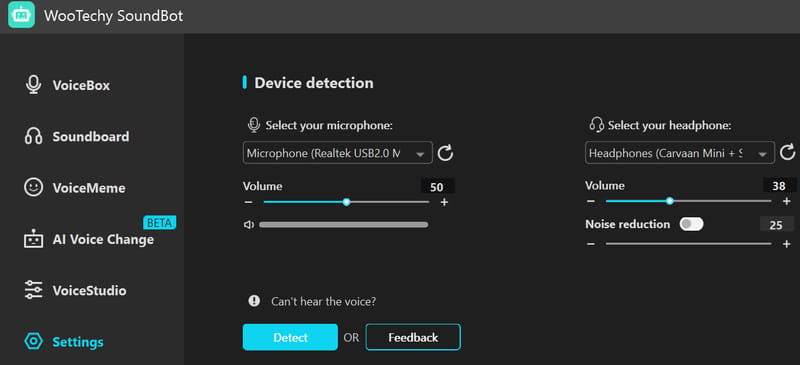
2. Open it and specify input and output devices from its settings, as shown in the screenshot below.
3. Select the VoiceBox option from the left pane and open its Horror category. After selecting the Horror category, you can change your voice to Yoda, as shown in the screenshot below.
4. When you select the Yoda option, Wootechy SoundBot automatically changes your voice to Yoda.
Now, you can record your message in Yoda’s voice and save it as an audio file on your PC. Click on the Record Voice Change option at the bottom right of the interface.
After that, record your voice and change it to Yoda’s voice, which you can save on your computer, as shown below.
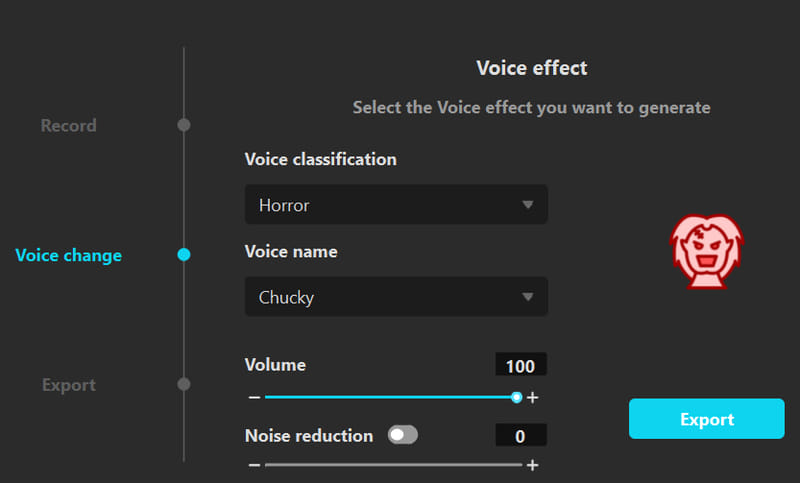 Click on the Export button to save the generated Yoda voice.
Pricing:
- 1-Quarter Plan: $12.95
- 1-Year Plan: $19.95
- Lifetime Plan: $39.95
Also Read: 5 Best Scrolling Text GIF Generator Websites
Conclusion
In this article, we reviewed the 5 best free Yoda voice generator websites. Being aware of such websites can add a hint of fun to your conversations, content, and daily life. We hope you found the article insightful. Please make sure that you share it with everyone.
About Himanshu Tyagi
At CodeItBro, I help professionals, marketers, and aspiring technologists bridge the gap between curiosity and confidence in coding and automation. With a dedication to clarity and impact, my work focuses on turning beginner hesitation into actionable results. From clear tutorials on Python and AI tools to practical insights for working with modern stacks, I publish genuine learning experiences that empower you to deploy real solutions—without getting lost in jargon. Join me as we build a smarter tech-muscle together.