2 Best APNG Compressor Websites for Animated PNGs

Our guides are based on hands-on testing and verified sources. Each article is reviewed for accuracy and updated regularly to ensure current, reliable information.Read our editorial policy.
APNG, or Animated Portable Network Graphics, is an extended PNG version that works similarly to animated GIF files.
Here is a list of the 2 best Animated PNG compressor websites. Using these online tools, you can hassle-free reduce the size of APNG files.
The best part is that one of these online tools supports batch APNG compression. That means you can upload multiple APNG files simultaneously, and the website will reduce their size one by one. After lowering the APNG file size, you can save it to your device.
Apart from that, one APNG compressor on this list offers editing features such as resizing, rotating, cropping, overlaying text, and removing background.
So, we have covered you if you are looking for an APNG compressor and editor.
Also Read: 5 Best Cartoon Characters Voice Generator Text-to-Speech Apps
2 Best Animated PNG Compressor Websites
While many online PNG compressor tools exist on the Internet, there are fewer suitable APNG file compressors.
If you use a regular PNG compressor, these tools will convert your APNG file to a PNG file, meaning all of its animations will be lost.
Let’s explore these APNG compressor websites and see how you can significantly reduce the size of APNG files without losing animation.
1. TinyPNG
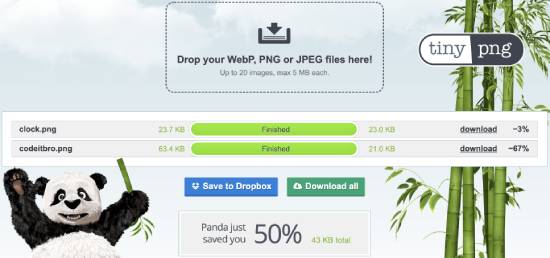
TinyPNG is a free APNG or Animated PNG compressor website. The best part is that it supports batch file compression.
You can upload up to 20 APNG images, each no more than 5 MB. During my testing, I reduced the size of APNG files to 67%.
So, it is a pretty reliable tool if you are looking to compress Animated PNG files in batches.
Getting started with TinyPNG is straightforward. Visit the website using the link below and upload your APNG files to compress. Once you select the APNG files to compress, it starts optimizing them.
You will see how much size is reduced for each file and the overall savings on the interface. Once the batch compression of APNG files is done, you can download all the optimized files in a ZIP file. Additionally, you can also choose to save them to your Dropbox account.
Try this APNG compressor here.
2. EZGIF
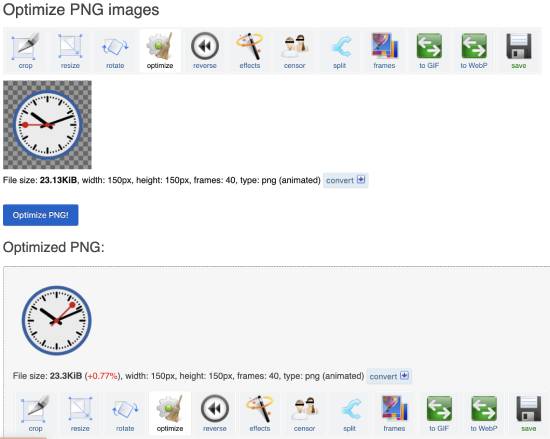
The following tool on this list of best Animated PNG compressor websites is EZGIF. It is a full-fledged online GIF editor that lets you perform many operations on GIF files, such as overlay text, create transparent GIFs, and make Boomerang GIFs.
The best part of EZGIF is that it can compress APNG files and perform other editing options such as resizing and rotating files, reverse animation, adding effects, and many others.
Visit the tool using the link below and upload your APNG file to compress. After that, click the “Optimize PNG!” button, and EZGIF will compress the uploaded APNG file.
As soon as you hit the “Optimize PNG!” button, you will get the compressed file below, and you can then choose to download it or perform other editing options using the toolbar.
Try this Animated PNG compressor here.
Wrapping Up
In this blog, we explored the 2 best Animated PNG compressor websites. My favorite is TinyPNG, which supports bulk APNG file compression and is more reliable than EZGIF.
However, EZGIF is an excellent option if you are looking for a full-fledged APNG editor and compressor. Try these APNG compressors yourself and see which one best suits your requirements.
About Himanshu Tyagi
At CodeItBro, I help professionals, marketers, and aspiring technologists bridge the gap between curiosity and confidence in coding and automation. With a dedication to clarity and impact, my work focuses on turning beginner hesitation into actionable results. From clear tutorials on Python and AI tools to practical insights for working with modern stacks, I publish genuine learning experiences that empower you to deploy real solutions—without getting lost in jargon. Join me as we build a smarter tech-muscle together.